Exploring collaborative AI Coding Agents
An experiment with manually orchestrating multiple Claude Code agents—Architect, Engineer, and Documenter—to build a chess web app. Covers planning, workflow, prompts, and lessons learned about working with collaborative AI coding agents.

Recently I’ve heard more about the topic of using collaborative AI agents when coding. I immediately found this idea very interesting, but also very intimidating, overwhelming and scary at the same time.
While I am not the biggest coder myself, I think I do know my way around some languages and IDEs and also code myself from time to time. I have to be honest though, I am not super deep down in the bubble and I am 100% sure many seasoned devs would be crying in horror when looking at the projects I’ve built myself so far. Still, I do try to follow all the news around agentic AI and I am also very intrigued by AI coding in general.
To try things out and find out how coding with multiple agents can work, I’ve set up an experiment to try multi agent coding. I will be using Claude Code in the 20$ pro plan (so no Opus, just Sonnet) to implement a basic chess web app to evaluate coding with multiple agents. While subagents, etc. are also a thing, I will focus on manually orchestrating agents for this first experiment. I will explain the project setup, how I got agents to do the things I wanted them to, and insights I gained from this experiment. Let’s get into it 🚴
Project Setup (CLAUDE.md file)
It didn’t make sense to just send of AI agents without any sort of plan and structure, so I focused on that first.
To give the agents some guidance, I created an CLAUDE.md file with general instructions on how to act. While researching, I’ve stumbled across a blog post from Jesse Vincent (https://blog.fsck.com/2025/10/05/how-im-using-coding-agents-in-september-2025/). I found the way he works with agents really interesting, and also really liked his CLAUDE.md file. So I decided to take his file as a base for mine and modified it to fit my needs and ideas.
You can find my version in this project’s GitHub repo:
 denishartl
Initial planning document
When starting this experiment, I just had a basic idea of what I would want the agents to implement: A web-based chess app. No user management, no database, just a simple web app which allows you to play chess.
While this is a starting point, this of course isn’t enough information for the agent to just start building. In all the experimenting and playing around so far I’ve learned, that the AI result is only as good as the instructions you give it.
Like I mentioned, I am not a fully fledged software engineer by any means, so I actually have no idea which frameworks or tools would work best for such an implementation.
Thankfully, Claude can also help me with that.
I started out with a basic prompt (also took inspiration from Jesse Vincent here: https://blog.fsck.com/2025/10/05/how-im-using-coding-agents-in-september-2025/) asking Claude to help me find appropriate tooling etc.
I've got an idea I want to talk through with you. I'd like you to help me turn it into a fully formed design and spec (and eventually an implementation plan)
Check out the current state of the project in our working directory to understand where we're starting off, then ask me questions, one at a time, to help refine the idea.
Ideally, the questions would be multiple choice, but open-ended questions are OK, too. Don't forget: only one question per message.
Once you believe you understand what we're doing, stop and describe the design to me, in sections of maybe 200-300 words at a time, asking after each section whether it looks right so far.
These are my current thoughts:
I want to create a webapp for a chess game. It should allow users to play against a computer in real time. The computer should have multiple difficulty levels. There is no need for a database or user accounts. When the webpage opens, the user should be able to choose the
difficulty level and start playing immediately. The chessboard should be interactive, allowing users to move pieces by dragging and dropping them. The computer opponent should use a chess engine to determine its moves based on the selected difficulty level. The UI should be
clean and responsive, working well on both desktop and mobile devices. Additionally, I want to include a feature that highlights possible moves for the selected piece to assist beginners. Finally, I want to implement a simple scoring system that tracks wins, losses, and draws
during the session.
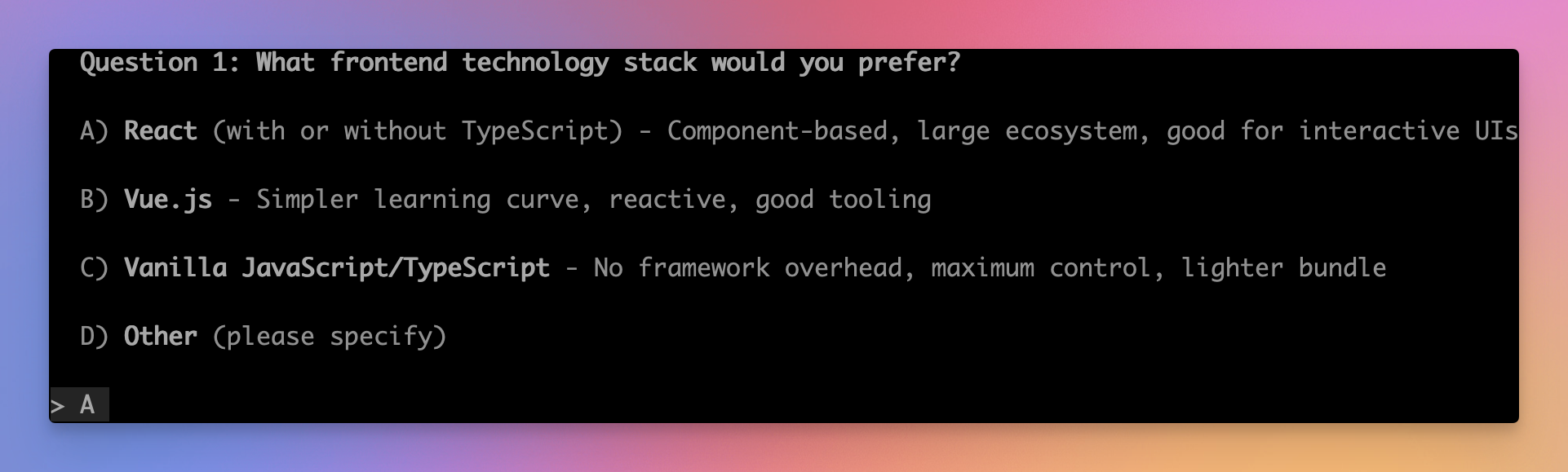
Claude then asked me a series of questions, for example:
I’ve really enjoyed this process and can imagine this being super helpful for brainstorming new ideas, researching and in general “getting things started”.
Once all of Claude’s questions were cleared up, it prompted me with it’s idea of the product we are building step by step:
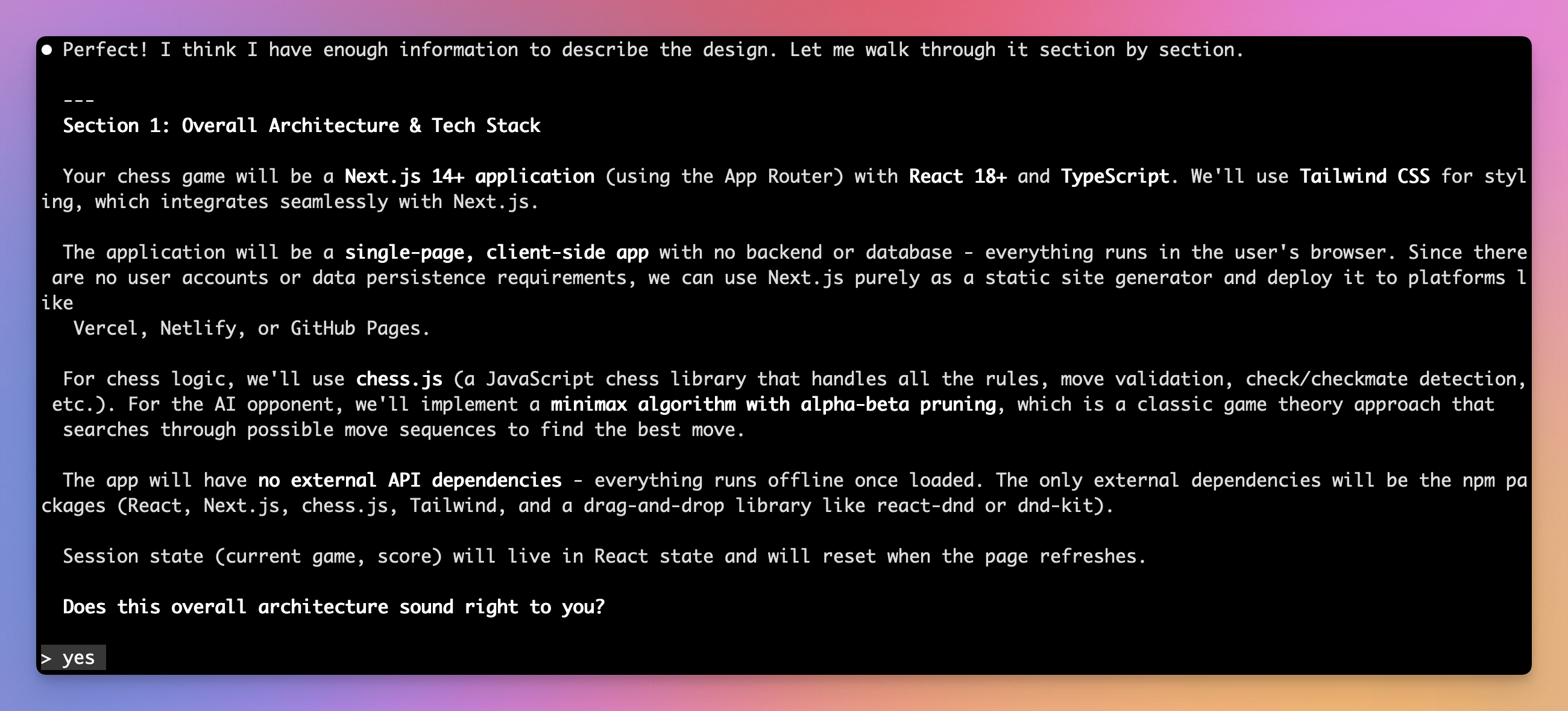
At each section, I can give it feedback and ask it to change things if required.
Once Claude and I were happy with the plan, I asked it to write the initial plan to an markdown file in the GitHub repo: https://github.com/denishartl/multi-agent-playground/blob/main/docs/initial_plan.md
After working out the details, here is a summary of the project, tech and scope:
- Browser based chess game where the player can play against AI with different difficulty levels (easy, medium, hard)
- Standard chess rules enforced
- Dual input methods (drag-and-drop or click-to-move) + optional move highlighting
- Session-based scoring (no persistence)
- Framework: Next.js 14 + React 18
- Language: TypeScript
- Styling: Tailwind CSS
Implementation plan
While the initial planning document gives some guidance on what the agents should build and how to do so, it still leaves room for lots of interpretation. As I mentioned before, something that really works with agents is to give them as much clear and specific guidance as possible.
To provide this guidance to the agents, I’ve expanded on the initial planning document with a very specific and concrete implementation plan for the agents to follow. This plan breaks down the entire implementation into small steps, which the agents can follow. It gives them a very clear scope of what to do and how to do it. Because of this, the implementation plan is very large and complex.
Like with with initial planning document, I’ve also used Claude to create the implementation plan. Again, I took inspiration from Jesse Vincent (https://blog.fsck.com/2025/10/05/how-im-using-coding-agents-in-september-2025/) here. This is the prompt I’ve used have Claude create the document:
Great. I need your help to write out a comprehensive  implementation plan.
Assume that the engineer has zero context for our codebase and questionable taste. document everything they need to know. which files to touch for each task, code, testing, docs they might need to check. how to test it.give them the whole plan as bite-sized tasks. DRY. YAGNI. TDD. frequent commits.
Assume they are a skilled developer, but know almost nothing about our toolset or problem domain. assume they don't know good test design very well.
please write out this plan, in full detail, into docs/plans/
The result was a 3161 line long document, breaking down the implementation into tiny steps, explaining exactly what the agent needs to do for each task, why he needs to do it, how to do it, which files to touch, how to test it and even which commit message to write. You can find this plan (implementation.md) in the GitHub repo: https://github.com/denishartl/multi-agent-playground/blob/main/docs/plans/implementation.md
At this point, I was both both impressed and skeptical. I was really impressed at the scale and amount of detail of the plan. I was also very skeptical, as I thought there is NO way, that Claude actually thought of everything – the whole file and directory structure, every file, every commit, etc. – before implementing anything. Like NO WAY. But I decided to stick with it and see where this goes.
💡 I’ve done this entire project with the 20$ Claude Pro plan. This means, that the entire planning was done by the Sonnet model, not Opus. It would have been interesting to see how Opus does here, but for the moment I am not ready to pay the 100$ monthly price for the Claude Max plan.
Manually orchestrating multiple collaborative AI Coding Agents
The first experiment for using multiple agents was to use multiple agents with manual orchestration. This essentially means that I have multiple instances of Claude running, each focused on a specific task. I act as their “overlord”, providing each of them with their individual tasks and feedback from each other.
I used three agents for my experiment:
- Architect – This is the same Claude instance I used before to create the initial planning document and the comprehensive implementation plan before. His role is to check and verify the work of the other two agents and to give feedback about their work
- Engineer – He’s the one doing the actual coding. He gets his tasks from the comprehensive implementation plan, working through it task-by-task. After each task, this work gets reviewed by the Architect.
- Documenter – His job is to create documentation for the code the Engineer implemented. He’s active after the Engineer is done with the implementation to create documentation about the actual code which was implemented. This work also gets reviewed by the Architect.
Workflow and prompts
At a high level, this is what the workflow looks like I used for the manual orchestration experiment:
- Engineer implements task
- Architect looks over task
- Engineer improves/fixes code based on Architect’s findings until Architect is satisfied
- Documenter creates documentation
- Architect looks over documentation
- Documenter improves/fixes documentation on Architect’s findings until Architect is satisfied
- Commit
/clearEngineer and Documenter- Repeat until everything is implemented
My console setup looks like this. I use iTerm2 (https://iterm2.com/). By splitting up the window in 4 panes, I have three panes where I monitor what the Claude agents are doing, and one console within the same directory where I can check and do stuff manually if I need to.
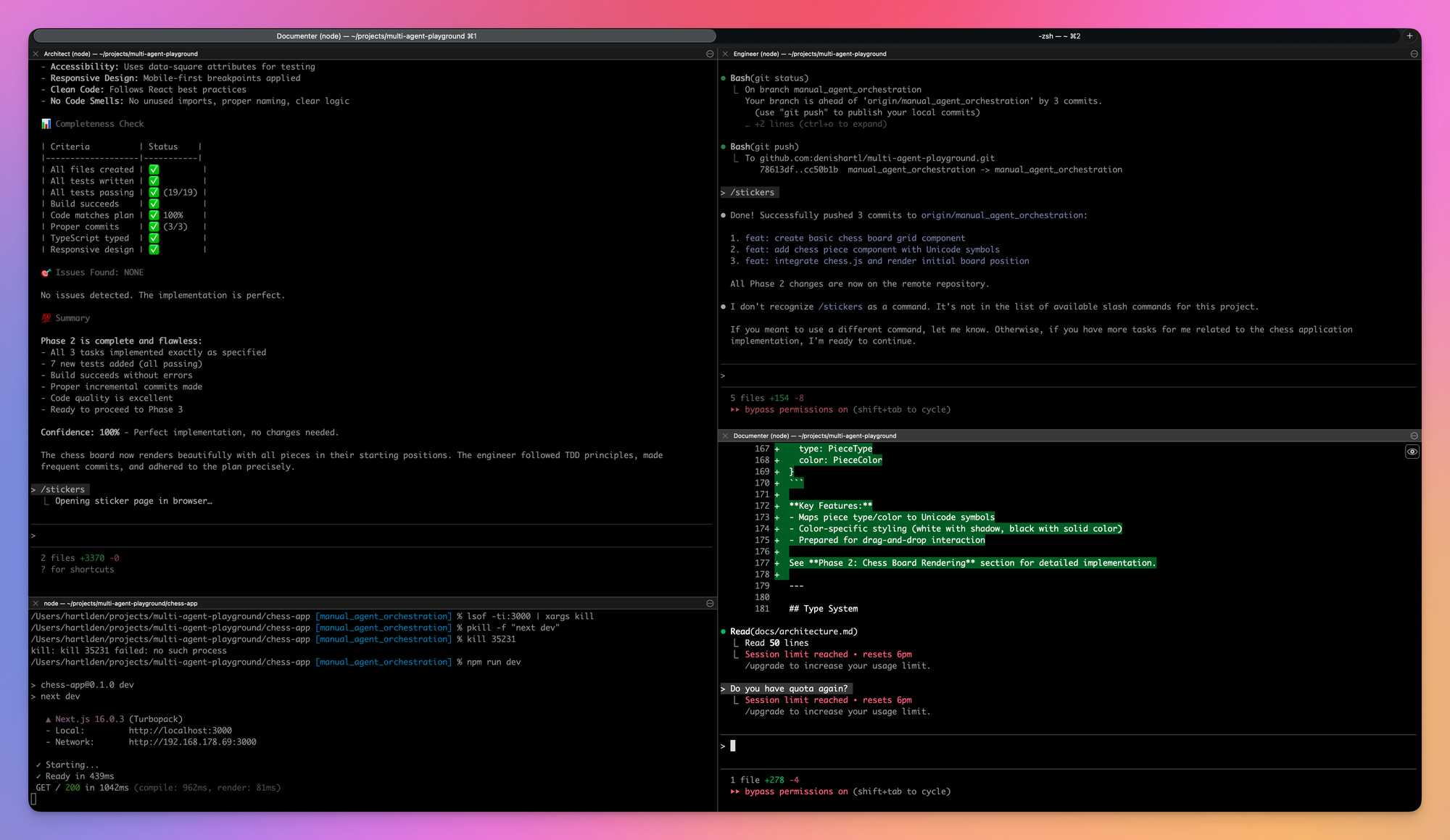
These are the prompts I’ve used for each of the agents:
Architect
Reviewing code:
The engineer says it's done task 1. Please check the work carefully.Reviewing documentation:
The documenter says it's done documentation for task 1. Please check the work carefully.Engineer
Initialization after /clear:
Please read @docs/plans/implementation.md and @docs/initial_plan.md. Let me know if you have questions about the plan itself. I will follow up with your actual instructions after.Start implementation:
Please implement task 1 and it's subtasks. If you have questions, please stop and ask me. DO NOT DEVIATE FROM THE PLAN.Documenter
Initialization after /clear:
Your job is to document implementations previously created by an enginner.
First, please read @docs/plans/implementation.md and @docs/initial_plan.md. Let me know if you have questions about the plan itself. I will follow up with your actual instructions after.
Start documentation:
Please create documentation for task 1 (and all of it's subtasks), which the engineer already implemented in code. If you have questions, please stop and ask me. DO NOT DEVIATE FROM THE PLAN.
I want you to document the actual implementation in chess-app/, so focus on reading and understanding the code first.
Create documentation files in docs/ folder as required.
I want you to focus on general, higher level documentation including general information which would be useful for a new developer to understand the codebase.
You do not need to document every single function or class, but focus on the main components, their interactions, and any non-trivial logic.
Do not copy-paste every piece of code into documentation.
I don't like it when there is duplicate information which needs to be maintained in two places.
💡 Initially I started with an simpler prompt for the documentation. The agent went all in however and created way more documentation than I liked, so I made the prompt more specific. More on that in the “Random noteworthy things and findings” section of this experiment.
Random noteworthy things and findings
A collection of random things I noticed and found noteworthy and interesting.
Errors in the implementation plan
I mentioned that I was skeptical about Claude designing the whole implementation plan for the project before ever implementing anything. And sure enough, the Engineer agent found an ran into an error when initializing the app with NextJS right when starting the implementation:
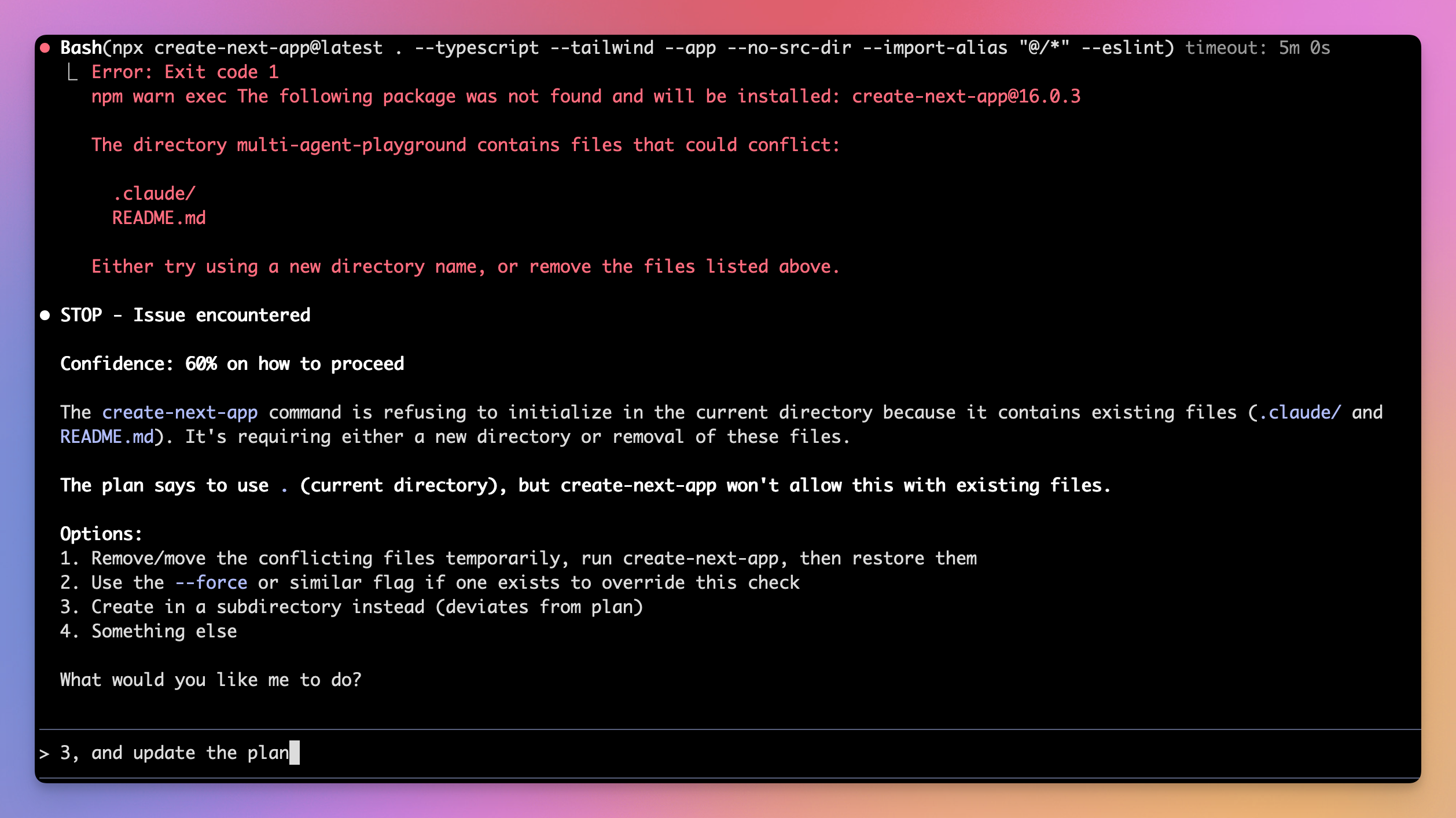
The agent asked for advice on what it should do, so I was able to course correct right away. I really liked this opposed to the agent just heading off blindly and trying to do something.
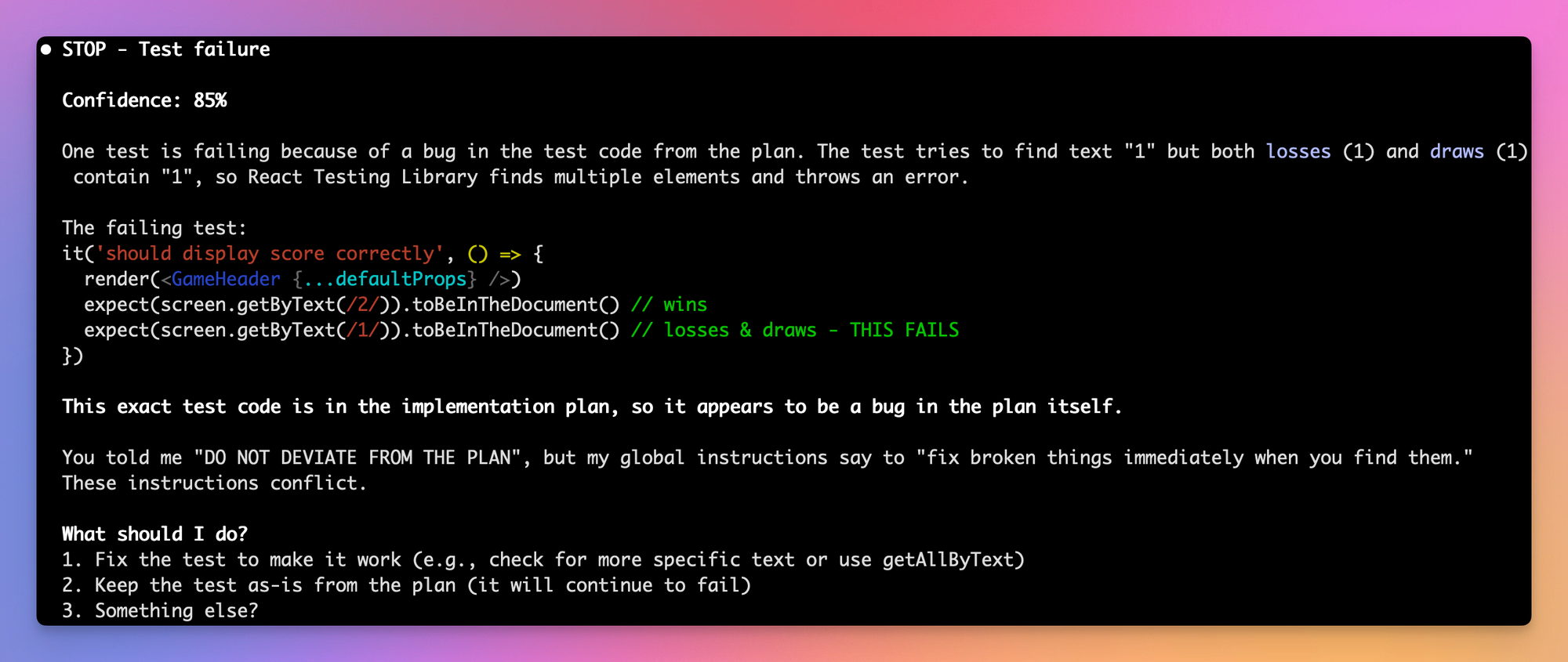
Second example, this time the Engineer found an error in a test written in the implementation plan:
Another example of an error the Architect found when reviewing the implementation of task 3:
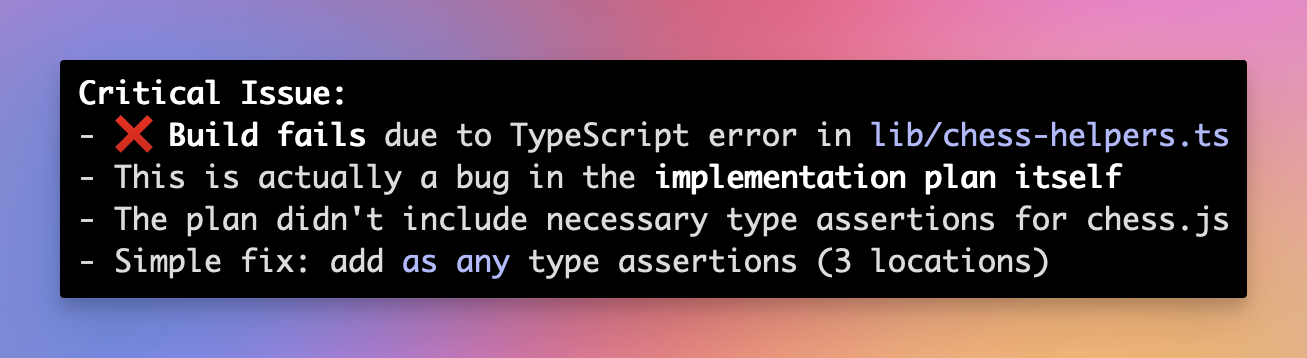
The Engineer was able to fix the error afterwards, but I would say this is something the Engineer should’ve found by himself during implementation.
Interestingly, this time the Engineer asked regarding the pre-written code from the Architect before implementation. All other agents before just saw that as a given and implemented the code.
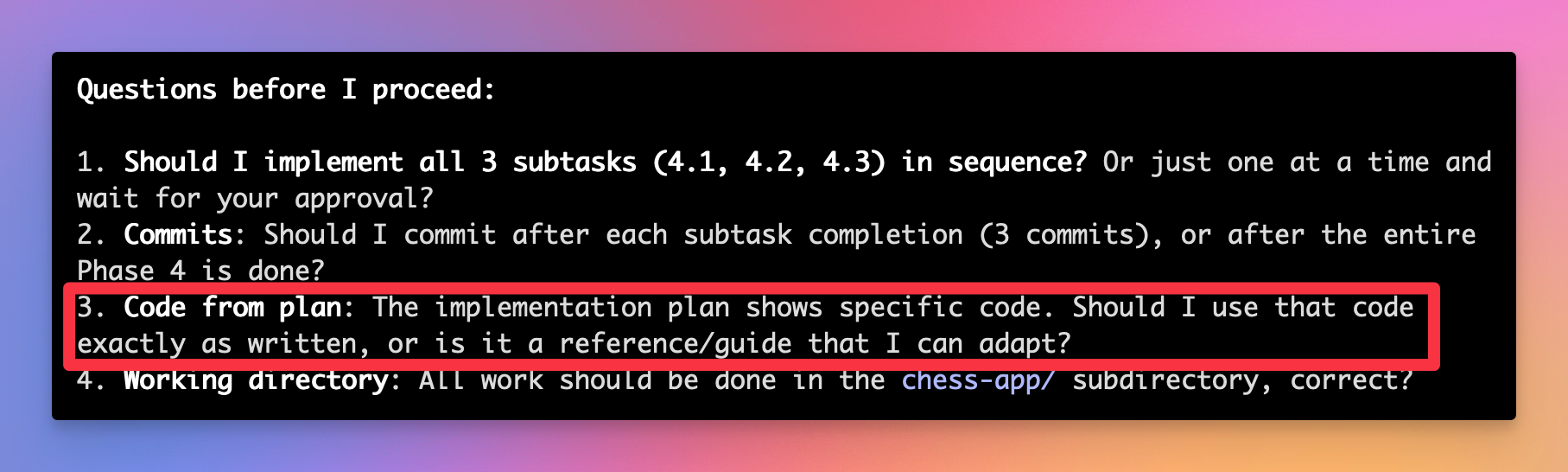
For all of these errors, I told the agent to fix them and also update the implementation code.
YOLO mode
When I initially started the experiment, I used Claude by just typing claude in my terminal. This launches Claude in a “safe” mode, where it asks for your permission for every command (e.g ls, md, git) it runs in the terminal. This is great for safety, but can become annoying quite fast. You have to allow every command Claude want’s to run. While you can build a whitelist for commands over time, this can still be quite annoying and distracting if you want to work on something else, while Claude is cooking in the background.
Thankfully, Claude can also be ran in a mode which skips this permission grant. This is called YOLO mode. And it is rightfully called so. This allows Claude to do anything it wants without asking for the users permission. For this reason, Anthropic provides a reference implementation (https://github.com/anthropics/claude-code/tree/main/.devcontainer) of how to run Claude within Docker containers to minimize the blast radius, should something go wrong.
🚨 Please be very careful when using this mode. This can have some bad consequences when Claude decides to do something you don’t like.
To run Claude in YOLO mode, launch it from console using this command:
claude --dangerously-skip-permissionsVERY motivated Documenter
When I had the Documenter create documentation for the first time, it was VERY determined to create comprehensive documentation.
Please create documentation for task 0 and 1 (and all of their subtasks), which the implementer already implemented in code. If you have questions, please stop and ask
me. DO NOT DEVIATE FROM THE PLAN.
This resulted in extremely exhaustive and comprehensive documentation.
While the Engineer had written about 300 lines of code, the Documenter created over 4000 lines of documentation to document these 300 lines of code. It was documenting every little thing about every function, every piece of code and so on. It also copied actual code to the documentation to explain it there.
I was not a fan of that. I don’t like having documentation (especially code) in multiple places, as this will lead to them drifting apart, making future usability and maintainability a nightmare. Because of that, I’ve revised the prompt to the one described above. With this modification, the documenter now creates only essential and brief documentation, which I like way more.
Session limits
I am using the 20$/month Claude code Pro plan for this experiment. And oh boy, is it frustrating!
As of writing this, I am in the middle of the experiment, working on task 4 of 6 from the implementation plan. At this point, I’ve hit session limits twice. Yes, using the three agent workflow surely creates some overhead, but we are still talking about a very simple app here. Can’t imagine how this would be working on larger projects. I am only using 2 tools (a journal tool https://blog.fsck.com/2025/10/23/episodic-memory/ and Context7 https://context7.com/), so I don’t think there should be much overhead from those.
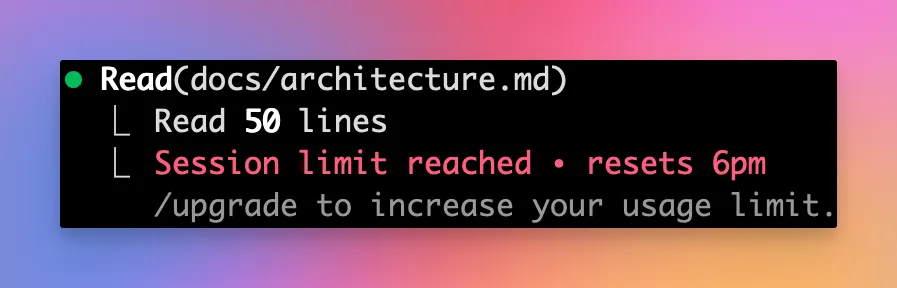
Final results
This is the final result after working through the entire implementation plan the Architect came up with beforehand. Not exactly what I would call a finished app. The entire chess board is just static, it’s impossible to interact with it or to move the individual figures. Here are some metrics:
- Lines of code (LOC): 945
- Length of documentation: 2766 lines
- 45 tests with 41% test coverage
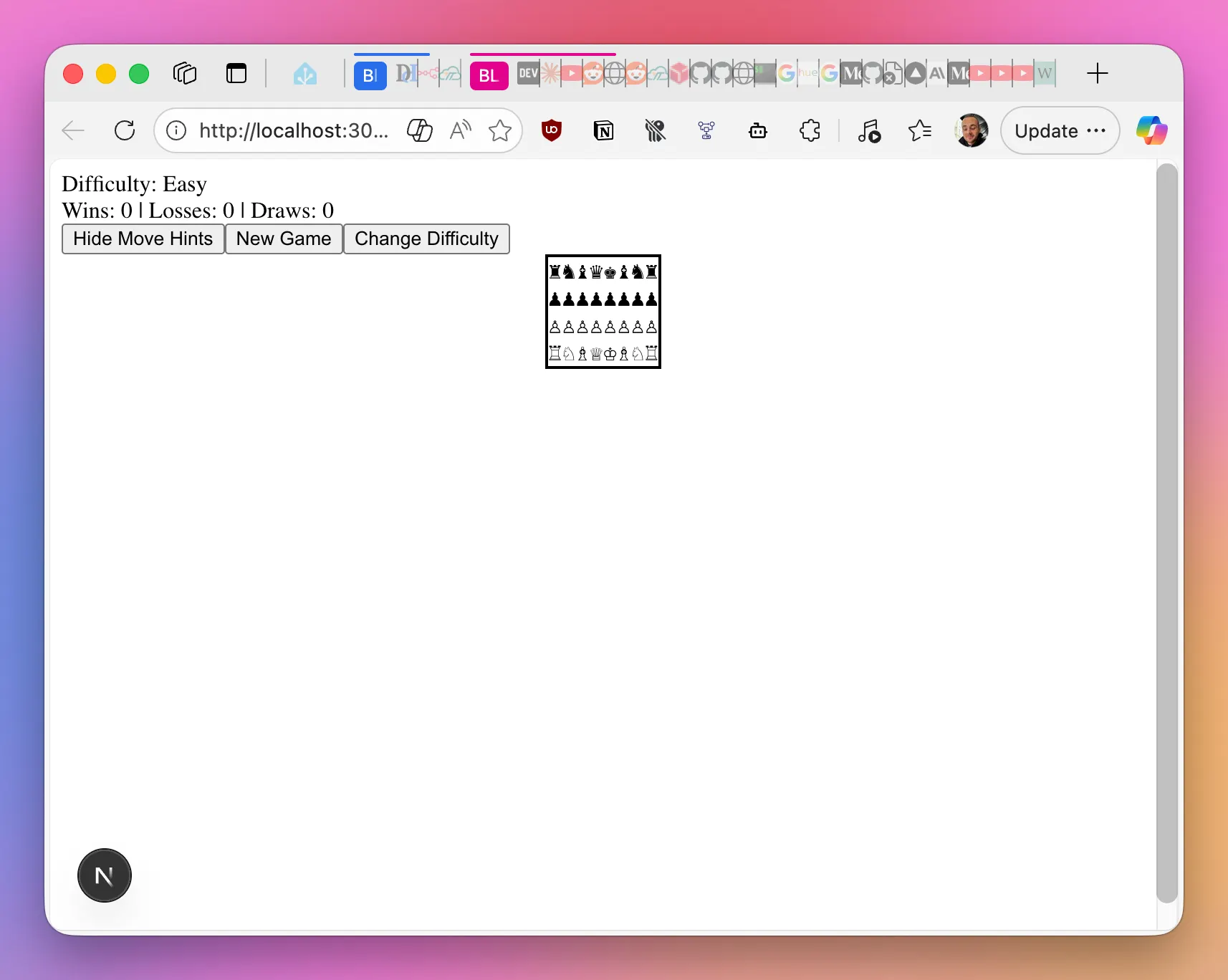
At this point, I am honestly not very surprised. I’ve mentioned before, that I really doubt the Architect could basically implement the entire app when it created the detailed implementation plan. It wrote out all of the code, all of the files to modify at each step, etc. The Engineer just took that guideline and copy-pasted the changes already described by the Architect. So – even if there was so much emphasis on a good plan at the beginning, it was that exact plan which probably resulted in failure at the end. Ironic.
Fixing the failure
As the final app obviously isn’t working, I wanted to see what it takes to get a functioning result at the end.
Because of that, I decided to spin up a new instance of Claude Code with a series of prompts to hopefully get it to fix the error. I also added the Playwright MCP server (https://github.com/microsoft/playwright-mcp) to give Claude the ability to actually “see” and interact with the web app.
You are an experienced software engineer, tasked with fixing an broken web app for chess. First, read @docs/plans/implementation.md
and
@docs/initial_plan.md. Let me know if you have questions about the plan itself.
Then read @docs/architecture.md, this is the documentation of the actually implemented app. Some of these files may be quite long,
make sure to read them completely.
I will follow up with your actual instructions and concrete information about the failure after.
Don't take this documentation for granted however, it was the basis for the failed app you now need to solve. This is just to give you
context about the app.
After that I told the agent what the issue is and about the Playwright tool it can use to find the issue:
Here is the main issue with this app: The web page loads fine and allows you to start a new game, but the chess board
is unusable. It's just some plainly rendered chess figures, no way to interact with them or anything. It doesn't look good and also
doesn't work.
Now go ahead and make a plan to fix this app. Ask me any questions you need to know.
I've equiped you with the Playwright tool, so you can investigate the app for yourself. Just start the npm dev server
and use your Playwright tool to take a look yourself.
After some debugging and looking at the app, the agent came up with an plan and implemented an fix.
The issue was rather simple: The chess app had Tailwind CSS v4 installed, but was using v3 syntax in globals.css . So it only needed to replace the Tailwind imports within globals.css and the app started to work!
This is how the app looks now:
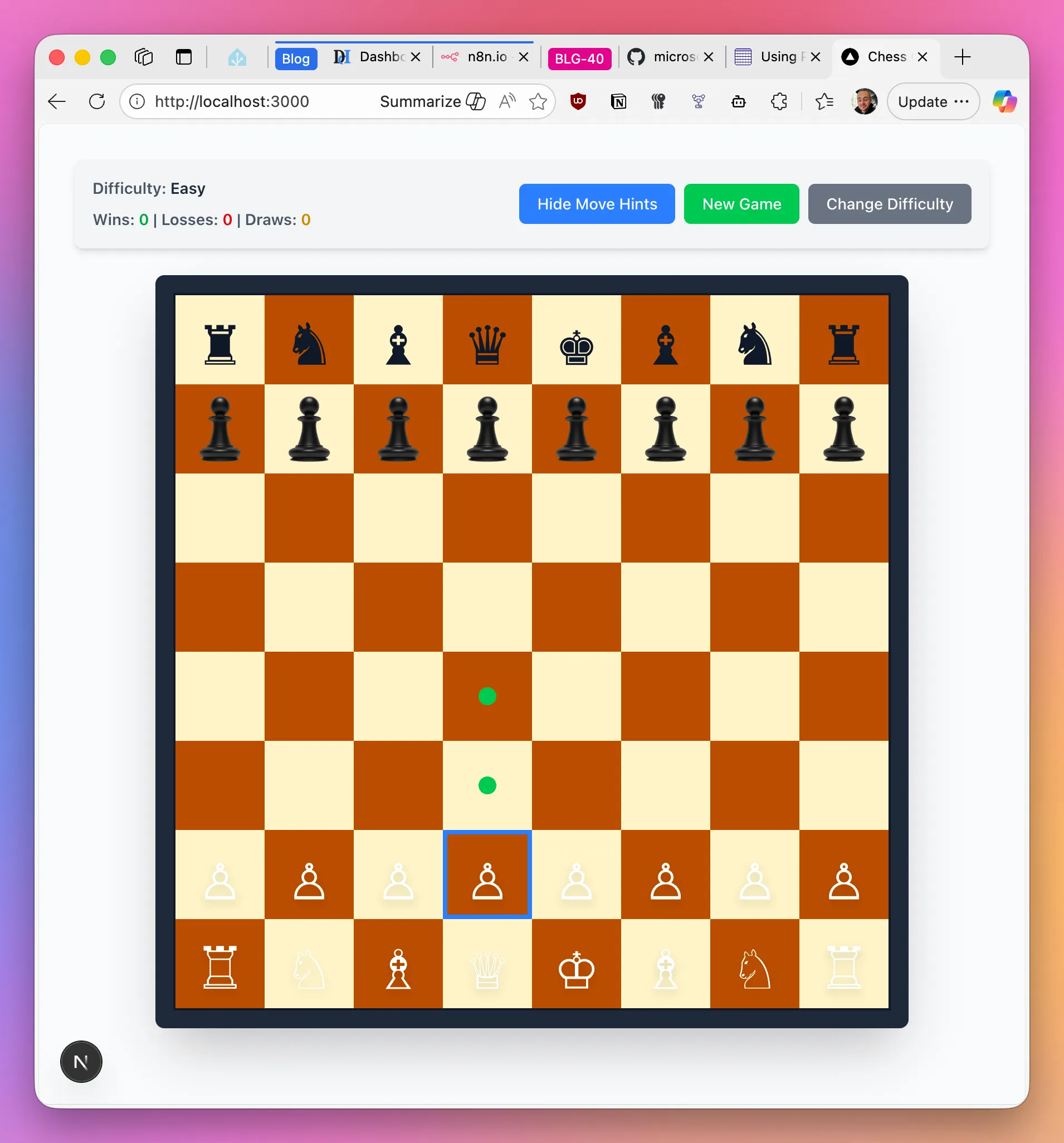
The chess board now renders correctly, the figures can be moved, and even the move hints work 🎉! I will admit, that the figures don’t really look that good, but that’s fine for now. At least we now have a working chess app.
Looking at the results now, I am quite surprised to be honest. Looking back, the architect basically prepared the entire app code during the planning phase, only with some minor errors which needed to be fixed. That is honestly something I did not expect. I have to admit, I am quite impressed after all. I am pretty sure that the final “breaking” issue is something which could have been avoided if the previous agents had access to the Playwright MCP server all the time.
Learnings
You are the boss
From my previous experiences with AI coding agents I already know that I don’t like it when agents just dive head first into the work, spitting out huge amounts of code and changes at once. It really feels overwhelming to me, and takes the fun out of it. More often than not I just went “ah, it’ll be fine” only to end up with a product which isn’t working and way too complicated.
Taking the approach I described here really worked for me. Planning everything out at first, implementing everything step-by-step really made it easier for me to keep up and not be overwhelmed. And that’s the nice thing about using agents. They (for the most part 🙃) do what you tell them. You can go them to go fast, or you can tell them to slow down to a pace with which you feel comfortable. I feel like the internet is full of those “I wrote this entire app in just one prompt” videos, telling you how amazing AI agents are and that you don’t have to do anything. However, this is quite far off my experience so far. Sure, I can tell agents to just do something. But in my opinion this is not sustainable over long term, as your code gets more complex and harder to overlook. Maybe it’s just me doing something wrong though, I don’t know 🤷.
Don’t be afraid to experiment and re-do things you don’t like
I feel like with the topic of AI coding everything is moving so fast and constantly changing. Because of that, I can often tell that I am doing things half-heartedly and don’t really spent the time to understand the things AI does, experiment and try things out, and also don’t re-do things I don’t like. But during this experiment I really took a step back and tried to understand why things weren’t working the way I wanted them to (e.g. the very motivated documenter). I tried to experiment, find a better way and eventually did. This wasn’t the most efficient and “fastest” way to do things. But it was very interesting and I learned way more this way.
Baby steps and the importance of clear communication
It’s so easy to feel overwhelmed when coding with AI. Agents will rush out to edit 10 files at once, adding hundreds of lines of code. It’s amazing. But it’s also scary. Because at the end of the day you are still the one who needs to review those hundreds of lines of code. Especially if this isn’t what you are doing all day anyway this can be overwhelming. Overwhelm leads to frustration, leading to half-baked solutions or you giving up in the end. I’ve certainly been there.
But that’s the thing. You can absolutely make the AI work in a way which is comfortable to you. You just have to find a way to tell it what you want and how it should work. Being specific and intentional in the way to communicate what you want is essential. Actually thinking through what you want to be done and how you want it do be done before just throwing the next “build an nice looking to-do app” prompt to an agent can really change the way you work with AI. And even beyond that, it can also improve your communication in general. In a weirdly beautiful way, AI agents are so intelligent and capable, but at the same time they are just an extension of their user. They can really hold a mirror up to yourself and (indirectly) point out flaws in the way you communicate and specify requirements. The next time an agent doesn’t do what you wanted him to do, take a step back and ask yourself, why the agent didn’t do what you wanted it to do. Maybe it was because you didn’t tell it exactly what you wanted it to do.
Coding agents can do more than just code
While AI agents can be really good at coding, they can do so much more than that. I know – that is nothing new. But I still find myself in this mindset where I just use AI to write out code without an real plan or concept (good ol’ vibe coding). However, AI can be so helpful to create that plan beforehand. It can help you choose a fitting framework and maybe ask some questions you didn’t even think about beforehand. You can take so much of the guesswork and potential for issues later on out of your work by creating that plan first, and AI can be a superpower for creating that plan.
Especially in scenarios where you aren’t working in pre-defined or restricted environments (e.g when working on an established code base), it can be really helpful to have an AI buddy there with you scoping out a new topic. I often find myself in a situation where it doesn’t really matter to me how exactly an problem is solved or which framework is being used. I just want a solution for my problem and a way to fix that problem. I explain that problem to an AI, and it helps me find a suitable solution first, creates a plan together with me, and then goes ahead and builds that solution for me.
Context and tools
While clear communication about how you want the agent to work and what you want it to do is important and essential to get the results YOU want, it’s equally as important to give the agents the tools and context it needs to do the work.
Think about it – how would you do in the same position? If you had to implement an web app without ever being able to look at the app, not able to evaluate and test it? It’s the same for AI agents. Give them documentation (e.g. Context7), give them tools and ways to interact with relevant systems and ways to check their work. It will make the agent’s live easier, which will in turn make your life easier. Doing some more work beforehand, implementing systems for the agent, will save you so much work an hassle down the line.
Bye
This was a journey! I had loads of fun doing this experiment, and I taught me a lot about working with collaborative AI Coding Agents and especially making them work for me, the way I want them to work. There absolutely also were some frustrating moments, but overall I learned a lot and I hope you can learn something from this too.
You can find the GitHub repository for this experiment here:
 denishartl
I’d love to hear your thoughts and any other feedback! Feel free to leave them in the comments. ❤️
If you like what you’ve read, I’d really appreciate it if you share this article 🔥
Until next time! 👋
Further reading
- The experiment’s GitHub repository: https://github.com/denishartl/multi-agent-playground
- Jesse Vincent’s Blog: https://blog.fsck.com/
- Anthropic Website: https://www.anthropic.com/
- Run Claude code within Docker container: https://github.com/anthropics/claude-code/tree/main/.devcontainer
- iTerm2: https://iterm2.com/
- Context7 MCP: https://context7.com/
- Playwright MCP: https://github.com/microsoft/playwright-mcp