How to Automate Hevy Workout Tracking with Notion and Azure Functions
Automatically sync Hevy weight lifting workouts to Notion using Azure Functions and webhooks. Includes database design, Notion charts for visualization, and complete code on GitHub.

In this guide, I’ll show you how to automate Hevy Workout Tracking to Notion using Azure Functions, giving you powerful visualization and reporting options.
Recently I’ve created a solution to automatically sync information from my running workouts to Notion via an Azure Function App. You can read about this here: https://denishartl.com/2025/10/31/tracking-workouts-from-apple-fitness-in-notion-using-azure-functions-and-ai/
Building upon this, I’ve extended the solution to automatically sync my weight lifting workouts to Notion as well 🚀
In this story I will explain what I’ve built and how it works. Let’s get into it 🚴
What is Hevy?
Hevy is a great app I use to track my weight lifting workouts in. It’s super simple and intuitive to use, and is my favorite after trying many other apps.
I also really appreciate the team behind Hevy, from what I can see and read online, they kind of seem like a bunch of geeks who like working out and also building a great app. For me, this shows in thinks they build around the app, including:
- An REST API
- A web interface which allows you to create and manage workout routines
- The option to send webhooks whenever you complete a workout built into the app (which comes in handy for the solution I built)
- HevyGPT (https://www.reddit.com/r/Hevy/comments/1kl1t8y/introducing_hevygpt/)
While I am in no way affiliated with them, I honestly just really enjoy their app and love using it. Check them out here:

Why Sync Workouts to Notion?
Hevy already has great and extensive reporting built in (it’s certainly more than I really need). So why bother to sync the workout information to Notion?
Firstly, because I can 🤡 Being serious though – I just love using Notion. It’s where I already have everything else about my life documented and stored, so I wanted to add the workout information as well. And I really enjoy building solutions like this, even if they are to solutions to problems which never really were problems in the first place 🤷.
Notion also has some reporting/charting capabilities built in now, so this also gives me an reason and excuse to play around with those as well.
💡 Note: The chart functionality in Notion requires an upgraded plan if you want to use it beyond some very basic limits.
Prerequisites to setup Hevy to Notion sync using Azure Functions
There are some things required for this setup:
- An Azure subscription in which the Function App and the required infrastructure around it can be deployed as well as a general understanding of the technology and how it works
- A Hevy Pro subscription to enable the use of webhooks and the API
- A Notion subscription to enable the creation of multiple charts
Automatic Workout Sync via Azure Functions
In the following section I will explain each piece of the puzzle and how it all works together.
Notion Database
The goal of this solution is to get workout data into Notion, so obviously Notion is where this all starts. There are three databases working together, all with relations to one another. This may be overkill, but it works in my use case.
Here is a diagram of how the databases are related:
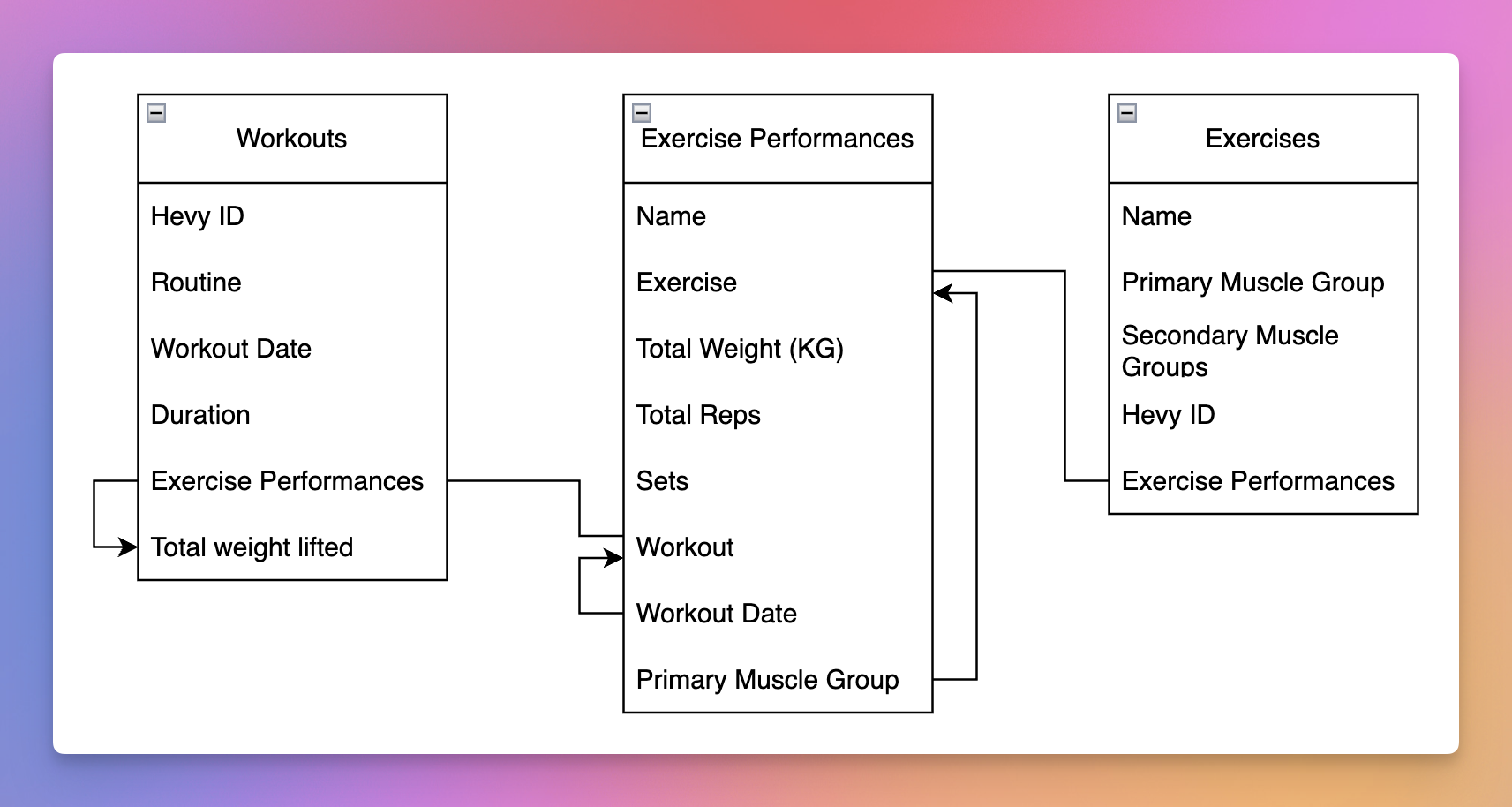
Lines without arrows show via which properties the tables have been connected – a so called relation in Notion.
Lines with arrows indicate fields, which get their data from a related property. In Notion this is called rollup. For example, when an exercise performance of “Bench Press” is logged, the field “Primary Muscle Group” isn’t filled manually. Instead the referenced “Exercise” and it’s “Primary Muscle Group” property get used. This is the exact point why i’ve separated exercises from their performances. Data for exercises only gets logged one in a central place, and exercise performances relate to that entry.
Database “Workouts”
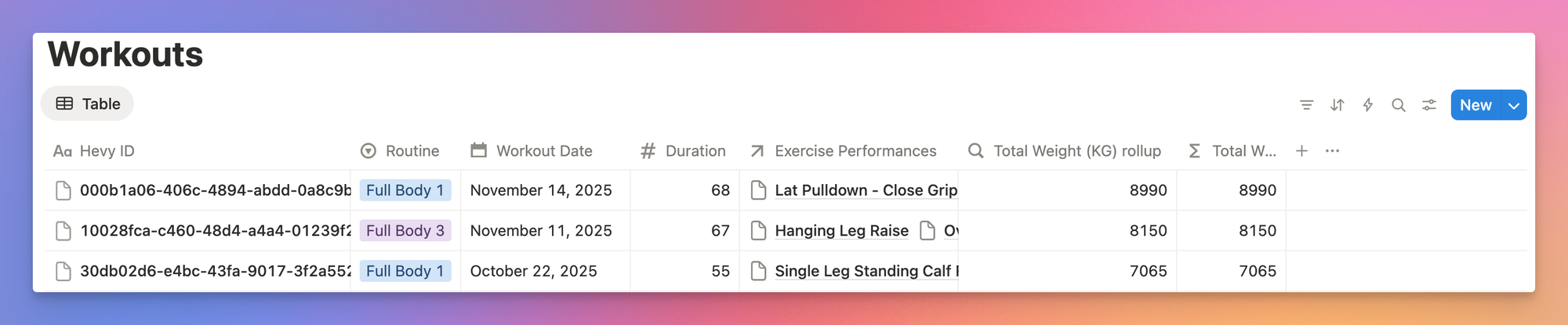
This database contains each workout. One workout is essentially one session in the gym, containing all of the exercise performances I did during a session. There is some metadata saved for each workout such as the duration, the date and the total amount of weight lifted. Here is what it looks like:
Database “Exercises”
The “Exercises” database contains each individual exercise (e.g. Bench Press or Leg Extensions). It’s NOT each performance of an exercise I did, but rather one type of exercise.
This exists to give some context to each performance of an exercise. For example, it included the main and secondary muscle groups hit by each exercise. This is there to allow for some reporting via Notion charts, which I will get into later. This database automatically gets filled via the Azure Function and it gets it’s information and data from the Hevy API.

Database “Exercise Performances”
The last of the three databases exists to track each individual performance of an exercise I did. For example, if my gym session consisted of Bench Press, Squats and Rows, there would be one database entry for each of those. These then relate to the “Exercises” database to get information about the muscle groups the exercise hits, and also to the “Workouts” database to group them together into one gym session. I’ve decided to combine multiple sets of one exercise into one exercise performance, so if I did 3 sets of 10 reps with 50kg, there would be 30 reps and 1.500kg recorded for this exercise performance.

Azure Function
The Azure Function is the main piece of the solution where all the magic happens. In short, this is what it does:
- Receive the incoming webhook from Hevy
- Fetch workout + routine from Hevy API
- Extract unique exercises
- Fetch exercise information from Hevy API
- Create/Update exercises in Notion
- Create workout entry in Notion
- Create exercise performance entries in Notion
Lets get into some detail 🔎 :
Step 1: Receiving the webhook
The Azure Function is triggered via an HTTP endpoint. This is the endpoint Hevy triggers every time when a workouts get finished. The webhook sent by Hevy only includes the ID of the workout which got finished, so further data retrieval is required to get all the information I want.
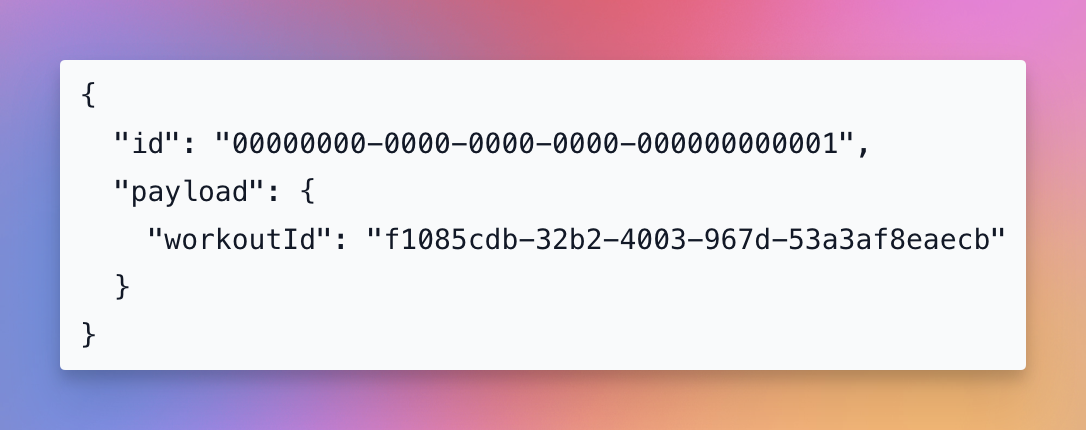
Step 2: Fetching complete workout data
Since the webhook only includes the ID of the just completed workout, some additional data retrieval from the Hevy API needs to happen.
First, all details about the workout need to be fetched. These include things like the exercises performed (spilt into individual sets) and the total workout duration. The response looks like this:
{
  "id": "b459cba5-cd6d-463c-abd6-54f8eafcadcb",
  "title": "Morning Workout 💪",
  "routine_id": "b459cba5-cd6d-463c-abd6-54f8eafcadcb",
  "description": "Pushed myself to the limit today!",
  "start_time": "2021-09-14T12:00:00Z",
  "end_time": "2021-09-14T12:00:00Z",
  "updated_at": "2021-09-14T12:00:00Z",
  "created_at": "2021-09-14T12:00:00Z",
  "exercises": [
    {
      "index": 0,
      "title": "Bench Press (Barbell)",
      "notes": "Paid closer attention to form today. Felt great!",
      "exercise_template_id": "05293BCA",
      "supersets_id": 0,
      "sets": [
        {
          "index": 0,
          "type": "normal",
          "weight_kg": 100,
          "reps": 10,
          "distance_meters": null,
          "duration_seconds": null,
          "rpe": 9.5,
          "custom_metric": 50
        }
      ]
    }
  ]
}
Step 3: Processing exercises within the workout
Based on the workout details just received, we can see that each exercise includes an exercise_template_id. This is the “Hevy ID” for the database “Exercises” I talked about earlier. The processing of the workout happens like this:
- Extract all unique exercises from the workout
- Fetch exercise templates from the Hevy API for each exercise
- Create OR update entries in the Notion “Exercises” database
This ensures that the exercise entry is there, which we can then use in the next step. This is the step, where primary and secondary muscle groups for each exercise get logged into Notion. The Hevy API provides this information, so I make use of that here.
Step 4: Creating the workout entry
Now that all the data required is fetched and prepared, the workout itself gets added to the Notion database. This is also done in a deduplicating way. If the workout ID already exists, the existing database entry gets updated rather than creating a new one.
Step 5: Recording exercise performances
Finally, each exercise performance gets logged into Notion as well. As mentioned when I explained each Notion database, for each exercise performance it’s reps and weights across all sets get combined together. Relations to the “Workouts” and “Exercises” within Notion get created during this step as well.
Special Sauce
There so some “special” sauce to the Azure Function, or rather some things worth pointing out.
Firstly, all API calls are implemented to be performed in parallel. I did this where possible to try to ensure that function runtimes would stay below 5 seconds. This is because Hevy expects an HTTP 200 response within 5 seconds of sending the webhook, otherwise the webhook will be resent.
Secondly, all Notion entries are made to be deduplicating. I’ve tried to ensure that existing entries always get updated instead of creating new ones. This is where the “Hevy ID” fields for the “Workout” and “Exercise” databases come in.
Azure Resources
There are some Azure resources required for this solution:
- Function App to host and run the function
- Supporting Storage Account for the Azure Function App
- App Service Plan which houses the Function App
- Azure Key Vault to securely store secrets
As I’ve built this project upon the existing solution I’ve built for running workouts, this infrastructure already was in place. All I needed to do was to add a second HTTP trigger to the Azure Function and also some secrets to the Key Vault.
I’ve created the whole infrastructure deployment via Bicep, so it’s easy to move, re-deploy and maintain. There is some more info about the infrastructure deployment in my original post: https://denishartl.com/2025/10/31/tracking-workouts-from-apple-fitness-in-notion-using-azure-functions-and-ai/
You can find the Bicep Infrastructure-as-Code deployment along with all the other code on GitHub:
 denishartl
Notion Reports
Up until this point, data has just been added to some tables. While this can be nice, visualizing the data to gain insights is even better. Thats where Notion charts come in.
💡 Notion charts require a paid Notion plan to use them beyond a very basic amount.
One example is to analyze the sets performed per muscle group to gain insights into workout distribution.
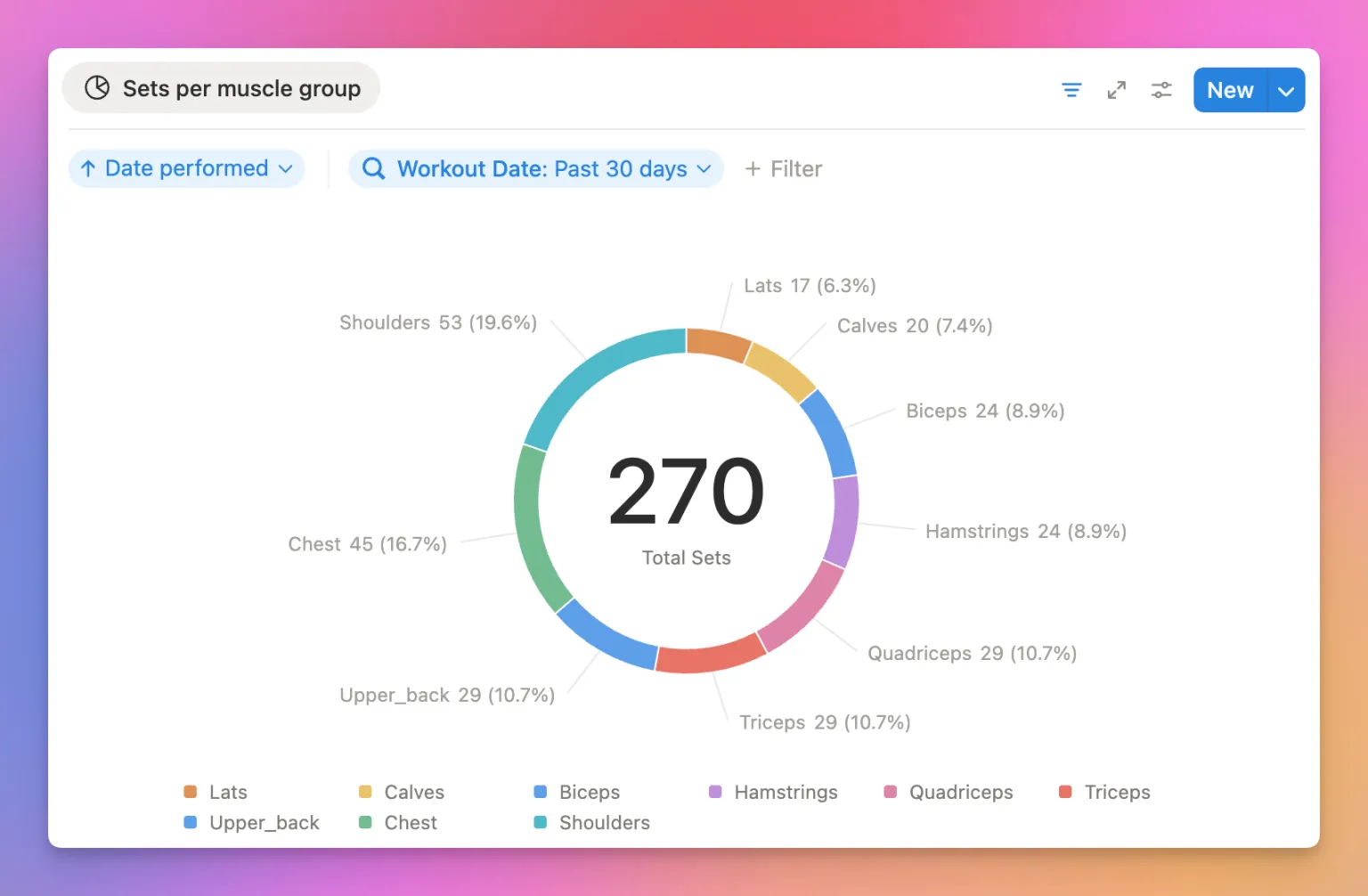
Another one is to see strength development over time for exercises.
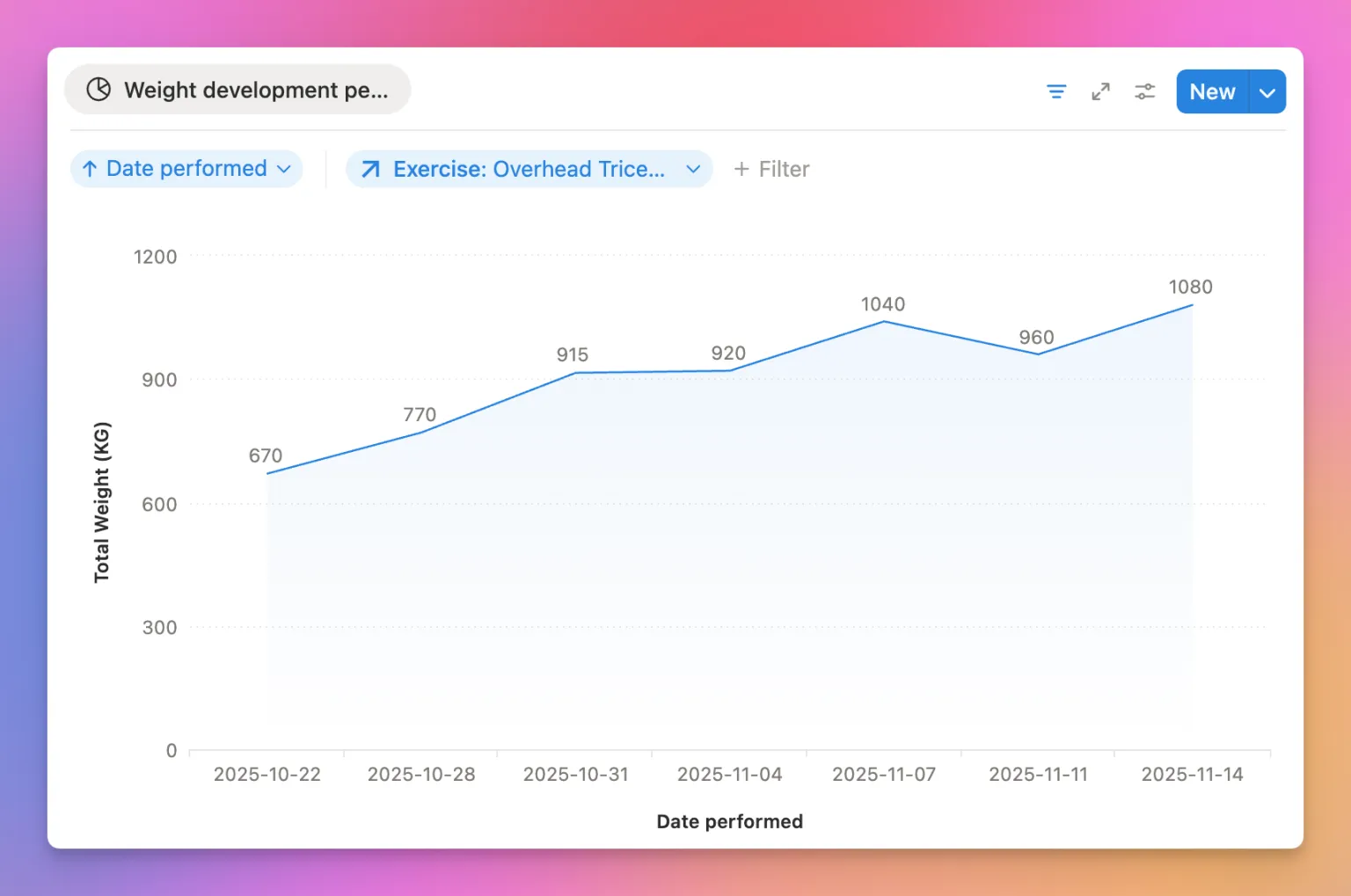
Rollups
Some of the database screenshots above showed columns being duplicated per database. This is because of one restriction within Notion charts: You can’t use rollup properties directly in Charts.
One example is the primary muscle group for exercises. Each exercise performance has an relation to the exercise database. From there information about the primary muscle group gets obtained via an Notion rollup. Since this property can’t be used directly within charts, another (essentially duplicate) database property needs to be created, this time of type formula. The only thing this formula does is to output the value from the rollup again:
format(prop("Primary Muscle Group (rollup)"))So, these duplicate values only exist to work around some limitations within Notion.
Hevy Webhook Setup
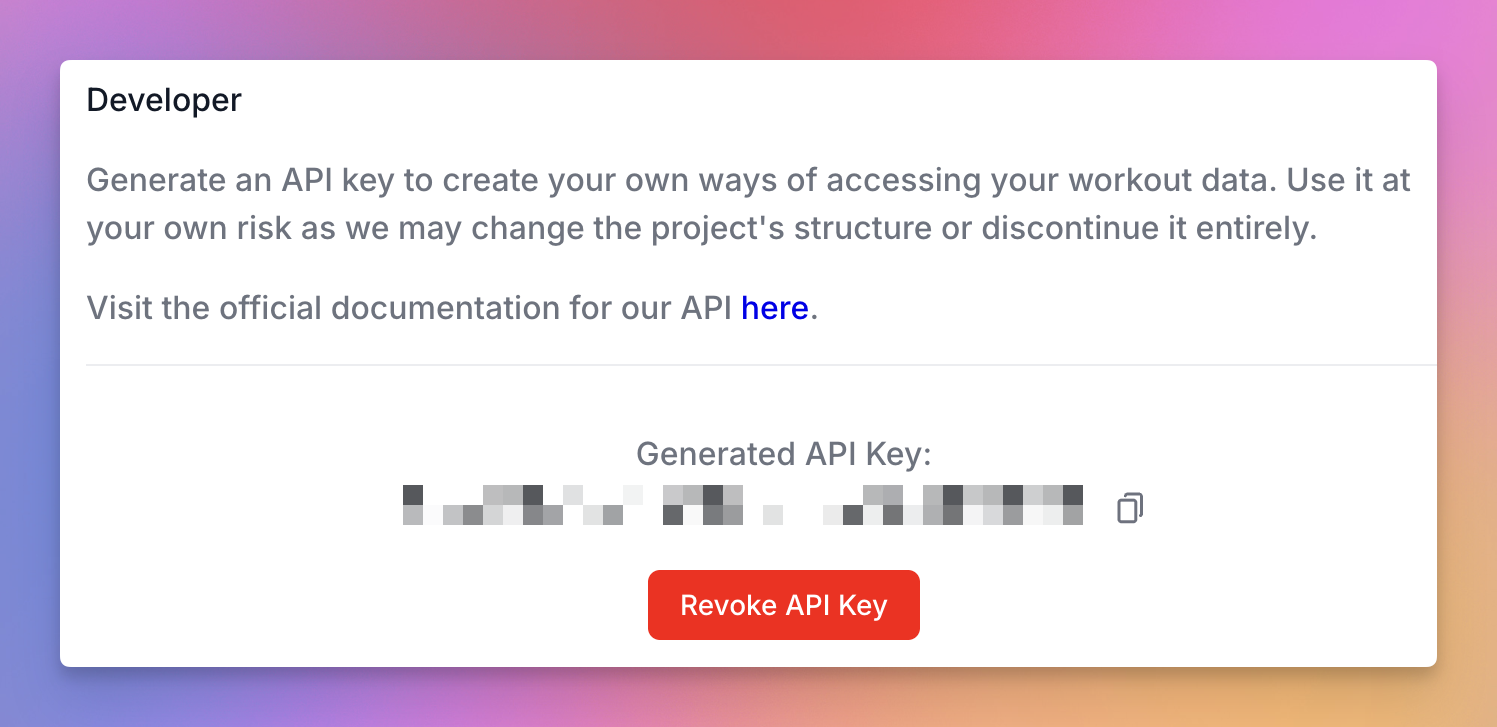
The last piece of the puzzle is within Hevy. As mentioned before, Hevy allows for the configuration of an webhook, which is fired whenever you complete a workout within the app. This allows the Azure Function App to be triggered whenever I complete a workout in Hevy, automatically syncing the workout information to Notion.

This webhook call can be configured in the developer settings within the Hevy web UI: https://hevy.com/settings?developer
Bye
I hope you found this interesting and maybe even useful. While this solution may be a little overkill, it was very fun to put this together and it is something I will continue to use as I progress in my weight lifting.
Do you also track your workouts? If so, how? I’d love to hear from you in the comments. Feedback of course is also always appreciated. ❤️
If you like what you’ve read, I’d really appreciate it if you share this article 🔥
Until next time! 👋
Further reading
- Hevy website: https://www.hevyapp.com/
- Hevy API documentation: https://api.hevyapp.com/docs/
- Notion API docs: https://developers.notion.com/
- GitHub repository: https://github.com/denishartl/workouts-to-notion