How to get free tokens for the OpenAI API
Get daily free tokens for the OpenAI API by enabling data sharing. Learn about eligibility requirements, token limits by model, and the trade-offs you should know before opting in.

Want to use OpenAI’s powerful AI models without spending money? Here’s how to get daily free tokens for the OpenAI API.
In this story I will show you how you can get daily (almost) free tokens for the OpenAI API. While you won’t need to pay money for them, you will need to pay with your data. But at least you have the choice. 🤷
⚠️ Note: This is for the OpenAI API, this is not for ChatGPT!
The following information is as of November 2025. This program may change over time, so make sure to consult official OpenAI documentation!
Let’s get into it! 🚴
How to get free tokens for the OpenAI API
To get the free tokens, head to this link to open the data sharing options for your OpenAI account: https://platform.openai.com/settings/organization/data-controls/sharing
Once there, you should see something like this under the section “Share inputs and outputs with OpenAI” if you are eligible for the free tokens. You will also see the token limit you are eligible for:
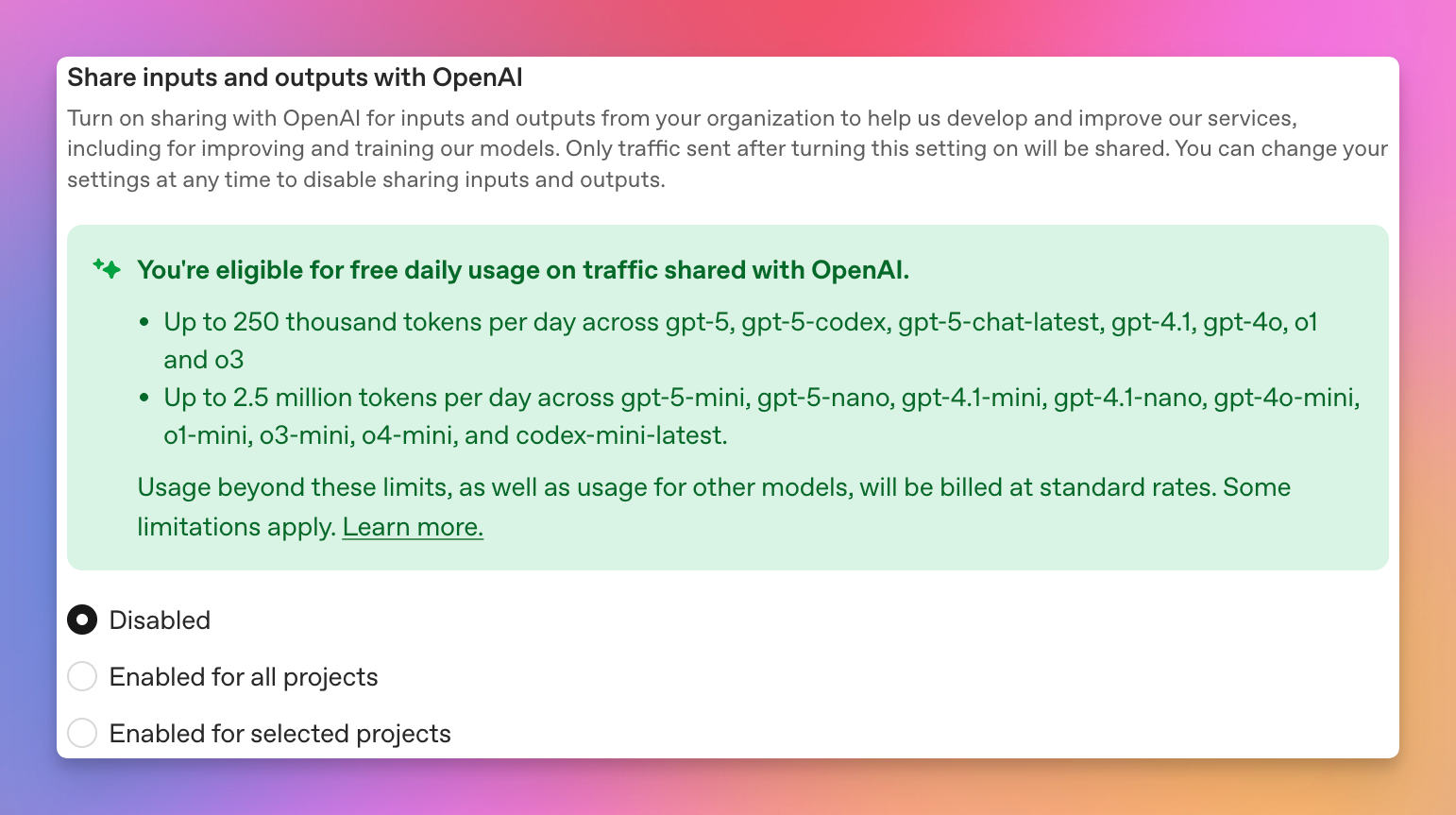
The amount of tokens you are eligible for may vary, depending on how much money you’ve spent on the OpenAI API before.
All you need to do now is to enable data sharing, and that’s it. Now you have access to free tokens each day 🎉
Please consider this carefully! After enabling this option, every prompt you send and every response generated will be shared with OpenAI. Only enable data sharing, if you are 100% fine with OpenAI reading everything you send!
What if I am not eligible for free OpenAI API tokens?
For you to be eligible, you have to be at least in Usage tier 1 to be able to claim the free API tokens. You can check your current status here: https://platform.openai.com/settings/organization/limits You will see something like this at the bottom of the page:
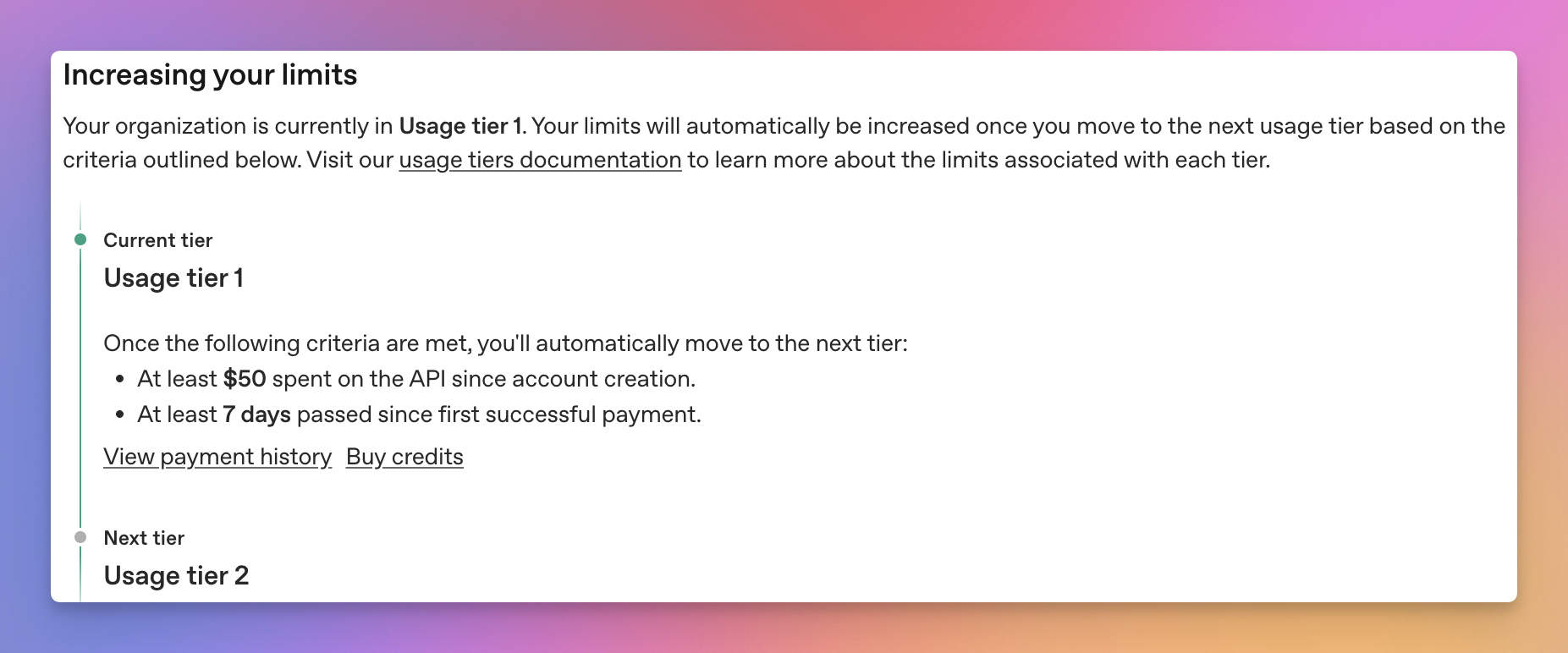
If you are not in Usage tier 1 yet, you can try adding some balance to your OpenAI account. To do so, head to https://platform.openai.com/settings/organization/billing/overview and add at least $5 to your account. When I did this, I chose to do 10$. After some time, check back again if you are now eligible for the free tokens.
You can find further information about usage tiers here: https://platform.openai.com/docs/guides/rate-limits#usage-tiers
🚨 I cannot guarantee that this method will work, so do this at your own risk! This worked for me, but I did not find an official statement from OpenAI confirming this.
API usage and model limits
Depending on the Usage tier you are in (see https://platform.openai.com/docs/guides/rate-limits#usage-tiers), there are different amounts of tokens you get for free each day. The amount also differs depending on which model you want to use. In general, there are two groups:
Token group A
Limits:
- Usage tier 1-2: 250k tokens per day
- Usage tier 3-5: 1M tokens per day
Included models:
- gpt-5-codex
- gpt-5-2025-08-07
- gpt-5-chat-latest
- gpt-4.5-preview-2025-02-27
- gpt-4.1-2025-04-14
- gpt-4o-2024-05-13
- gpt-4o-2024-08-06
- gpt-4o-2024-11-20
- o3-2025-04-16
- o1-preview-2024-09-12
- o1-2024-12-17
Token group B
Limits:
- Usage tier 1-2: 2.5m tokens per day
- Usage tier 3-5: 10M tokens per day
Included models:
- gpt-5-mini-2025-08-07
- gpt-5-nano-2025-08-07
- gpt-4.1-mini-2025-04-14
- gpt-4.1-nano-2025-04-14
- gpt-4o-mini-2024-07-18
- o4-mini-2025-04-16
- o1-mini-2024-09-12
- codex-mini-latest
⚠️ Please note, that the daily token limit is shared within a token group. For example, you could use 125k tokens of gpt-5-codex and 125k tokens of gpt-5-chat-latest within a day.
To check your usage, head to the following portal: https://platform.openai.com/settings/organization/usage
Things to look out for when using the free OpenAI API tokens (”Gotchas”)
There are a few gotchas you should be aware of when using the free tokens:
- You share all of the data with OpenAI when using their services. Don’t underestimate this and make sure you are fine with this.
- Token limits are shared within a token group, not per model.
- OpenAI may cancel this offer at any time. They state, that you will get a 30 day notice before however.
- Make sure to add an budget alarm and limit here: https://platform.openai.com/settings/organization/limits
Bye
I hope you found this interesting and maybe even useful. Maybe you’ll even use this for your own projects like I did. I certainly think it’s a nice way to get some free usage on AI models to play around with, learn, and to add to personal projects. It’s nice to have that option without having to spend money.
Have you tried using free API tokens? What will you build with them? Share your projects or any feedback in the comments! ❤️
If you like what you’ve read, I’d really appreciate it if you share this article 🔥
Until next time! 👋