AI Sitting Posture Detection with NVIDIA Jetson Orin Nano: Web UI and Alerting (Part 2)
Deploy your YOLO posture model on Jetson Orin Nano using FastAPI. Build a websocket web UI, alerting system, and MacOS app. Full source code included.

Learn how to deploy a trained YOLO model as a FastAPI server on the NVIDIA Jetson Orin Nano, with websocket-powered live preview and cross-platform alerting.
This post continues my journey with the Jetson and also AI workloads. During this journey, I am taking you along my learning experience about running AI workloads, and just "getting into AI" in general. I will be sharing my experiences, learnings, challenges I encountered, and everything in between. In the last post I trained a custom YOLO vision model to detect my sitting posture. You can find it here:
 Denis Hartl
This post is the second in a series of posts where I work on an AI application looking at my posture while sitting, alerting me when I start to slouch or sit with bad posture. The focus for this second will be on putting the trained model into a server application running on the NVIDIA Jetson Orin Nano, serving a web UI and also as an endpoint for a MacOS application.
Project introduction and goal
I've been struggling with my sitting posture since forever now. Whenever I am working at a desk - of which I do a lot - I just cannot sit straight with good posture. I keep shifting around, sitting cross legged or even sitting uneven, leaning and putting strain on one side of my body. I also slide down my chair a lot, "shrimping" (slouching) in the chair.
While shifting around while sitting isn't bad per se, I do think that these ways in which I am sitting aren't healthy either. I'd much rather sit straight with good form while sitting, and then switch it up with my standing desk throughout the day.
That's where the first project I want to do with the Jetson comes in: Detect whenever I am sitting in a "bad" position and send alerts whenever I do.
As of now, I have planned four parts for this project:
- Part 1: Model training and preparation
- Part 2: Web UI and alerting (this post!)
- Part 3: Implementing a continuous learning cycle with human feedback to improve the model even further over time
- Part 4: Increasing efficiency by using a lightweight person detection model as a pre-filter, only running the posture detection model when a person is present
Every blog post about this project can be found on the project page.
All code for this project and mentioned in the following blog post can be found in the GitHub repository.
 denishartl
My last post was about part 1 of this project, preparing an initial version of the YOLO model, including data collection and training.
This second part will be about packing the model into a server process running on the Jetson, together with a web UI for real time previews, alerting logic and integration into a MacOS application for posture notifications.
Application architecture and plans
The goal was to create a server/background application running on the NVIDIA Jetson Orin Nano. This app should use the model trained and prepared in the previous post to check my sitting posture regularly.
When bad sitting posture is detected, there should be a notification to remind myself to correct my sitting posture. I already created a MacOS application called PostureCheck to send sitting posture reminders on a timer basis before, so I wanted to expand this app to use alerts generated by the Jetson Posture Monitor.
 denishartl
In addition to the MacOS application there should also be a web UI which allows me to get a real time preview of the video capture and inference running. This will also be used for the human-in-the-loop integration for part 3 of this project.
My plan was to use websocket connections between the server running on the Jetson and the web UI and MacOS application to enable real time updates and alerting.
Some technical details for the implementation:
The server should be a Python application using FastAPI to serve websocket (for real-time updates) and REST API (for status queries and some actions) endpoints. A FastAPI lifespan event will be used to have the inference loop running in the background. Uvicorn will be used to pass the HTTP requests on to FastAPI.
Like what you are reading so far? Consider subscribing to my blog to get new posts directly to your inbox.
YOLO posture prediction inference as FastAPI lifespan event
I first created a lifespan event calling the inference loop in main.py.
@asynccontextmanager
async def lifespan(app:FastAPI):
    # STARTUP: run once when the app starts
    inference_loop = InferenceLoop(state)
    task = asyncio.create_task(inference_loop.run())

    yield # App is now running and serving requests

    # SHUTDOWN: runs when the app stops
    task.cancel()
Lifespan initiation within main.py for inference loop
This starts the inference loop on application startup and keeps it running in the background.
All of the inference code can be found in inference.py.
It first prepares the camera capture and loads the pre-trained model from part 1 of the Jetson Posture Monitor series. I wanted the inference to only run every few seconds to avoid unnecessary load on the Jetson, so inference only happens on an configurable interval. For now I am using 3 seconds. The results of the inference get processed and written to shared application state (more on that later). The image used for inference also gets annotated and Base64 encoded for use in the web UI.
💡 One idea to improve the inference update being sent via websocket would be to only include the Base64 encoded image only when a client is connected which actually expects it. This could reduce network bandwidth.
The image and the results get sent out to all connected websocket clients and the current posture prediction gets passed on to the alerting logic (more on that later too).
from time import time
import asyncio
import cv2
from ultralytics import YOLO
import base64
import json
from alerting import check_for_alert

def gstreamer_pipeline(
    capture_width=640,
    capture_height=480,
    framerate=30,
    flip_method=2,
):
    return (
        "nvarguscamerasrc ! "
        "video/x-raw(memory:NVMM), "
        "width=(int)%d, height=(int)%d, "
        "format=(string)NV12, framerate=(fraction)%d/1 ! "
        "nvvidconv flip-method=%d ! "
        "video/x-raw, width=(int)%d, height=(int)%d, format=(string)BGRx ! "
        "videoconvert ! "
        "video/x-raw, format=(string)BGR ! appsink drop=true max-buffers=1"
        % (capture_width, capture_height, framerate, flip_method, capture_width, capture_height)
    )

class InferenceLoop:
    def __init__(self, state):
        self.state = state

    async def run(self):
        cap = cv2.VideoCapture(gstreamer_pipeline(), cv2.CAP_GSTREAMER)
        model = YOLO("models/trained-with-augmentation.engine", task="classify")

        last_inference = 0
        try:
            while True:
                ret, frame = cap.read()
                if not ret:
                    break

                now = time()
                if now - last_inference >= self.state.interval:
                    results = model.predict(frame)
                    annotated = results[0].plot()

                    retval, buffer = cv2.imencode('.jpg', annotated)
                    jpg_as_text = base64.b64encode(buffer)

                    results_dict = {}
                    classes = results[0].names
                    results_array = results[0].probs.data.cpu().numpy()

                    for i, (class_index, predicted_class) in enumerate(classes.items()):
                        results_dict[predicted_class] = float(results_array[i])

                    self.state.predictions = dict(sorted(results_dict.items(), key=lambda item: item[1], reverse=True))

                    await self.state.message_all_clients(json.dumps(
                        {
                            "type": "inference-update",
                            "predictions": self.state.predictions,
                            "img": jpg_as_text.decode("ascii"),
                            "interval": self.state.interval
                        }
                    ))

                    last_inference = now
                    await check_for_alert(self.state, next(iter(self.state.predictions.keys())))
                await asyncio.sleep(0.1)

        finally:
            cap.release()
inference.py
Shared application state
As mentioned before, the application uses a shared state object to save some timestamps and other configuration throughout the application, keeping the information accessible everywhere.
The class AppState being used for this is defined in state.py.
from fastapi import WebSocket
import json

class AppState:
  def __init__(self):
    self.predictions = {}
    self.interval = 3
    self.active_clients = []
    self.alerting_enabled = True
    self.alerting_cooldown_seconds = 60
    self.alerting_threshold_seconds = 10
    self.last_alert_timestamp = None
    self.first_bad_posture_timestamp = None

  async def enable_alerting(self):
    self.alerting_enabled = True
    await self.message_all_clients(json.dumps(
        {"type": "alert-update", "alerting_status": self.alerting_enabled}
    ))

  async def disable_alerting(self):
    self.alerting_enabled = False
    await self.message_all_clients(json.dumps(
      {"type": "alert-update", "alerting_status": self.alerting_enabled}
    ))

  async def add_client(self, websocket: WebSocket):
    self.active_clients.append(websocket)

  async def remove_client(self, websocket: WebSocket):
    self.active_clients.remove(websocket)

  async def message_all_clients(self, message: str):
    for active_client in self.active_clients:
      try:
        await active_client.send_text(message)
      except:
        await self.remove_client(active_client)
state.py
The class gets initiated within main.py on application startup and is then used throughout the application to store information and websocket clients.
state = AppState()AppState initiation within main.py
Posture Alerting Logic with Cooldown and Threshold
The goal of this project is to create an app which alerts me whenever I sit with bad posture, so obviously I needed some alerting logic. I wanted to add a cooldown between alerts to avoid spamming, and also a threshold so that the model needs to detect bad posture a few times in a row before triggering an alert, also to avoid spamming and single false detections.
The following properties within the shared app state are used for alerting:
alerting_enabled: Tracks whether alerting is enabled to not (no alerts are sent when alerting is off)alerting_cooldown_seconds: Cooldown duration between alertsalerting_threshold_seconds: Duration for which bad posture has to be detected before alertinglast_alert_timestamp: Timestamp of the last alert, used in combination withalerting_cooldown_secondsfirst_bad_posture_timestamp: Timestamp when the first bad posture has been detected, used in combination withalerting_threshold_seconds
These properties are then used in combination with the inference prediction result within alerting.py to create the alerting logic.
import datetime
import json

async def check_for_alert(state, current_posture):
    if current_posture != "bad_posture":
        state.first_bad_posture_timestamp = None
        return

    if current_posture == "bad_posture":
        if state.first_bad_posture_timestamp == None:
            state.first_bad_posture_timestamp = datetime.datetime.now()
        else:
            if state.first_bad_posture_timestamp + datetime.timedelta(seconds=state.alerting_threshold_seconds) < datetime.datetime.now():
                if state.last_alert_timestamp == None:
                    await send_alert(state)
                elif state.last_alert_timestamp + datetime.timedelta(seconds=state.alerting_cooldown_seconds) < datetime.datetime.now():
                    await send_alert(state)
alerting.py
Alerts are then being sent out to all websocket clients.
async def send_alert(state):
    if state.alerting_enabled == True:
        state.last_alert_timestamp = datetime.datetime.now()
        await state.message_all_clients(json.dumps(
            {
                "type": "alert",
                "message": f"Bad posture detected for {state.alerting_threshold_seconds} seconds!"
            }
        ))
alert.py
I also added two REST API endpoints via FastAPI to enable and disable the alerting. This will be used by the web UI and MacOS application later on.
# API endpoint to turn alerting on
@app.post("/api/alerting/enable")
async def enable_alerting():
    await state.enable_alerting()

# API endpoint to turn alerting off
@app.post("/api/alerting/disable")
async def disable_alerting():
    await state.disable_alerting()
API endpoints for alerting in main.py
Websocket connections for real-time connections
Websockets are used to enable real time updates from the server to the web UI and MacOS application. To do so, I first added the websocket endpoint via FastAPI in main.py.
@app.websocket("/ws")
async def websocket_endpoint(websocket: WebSocket):
    await websocket.accept()
    await state.add_client(websocket)
    try:
        while True:
            await websocket.receive_text()
    except:
        await state.remove_client(websocket)
Websocket FastAPI endpoint in main.py
Websocket clients and messages to them are then handled within the app state.
async def add_client(self, websocket: WebSocket):
  self.active_clients.append(websocket)

async def remove_client(self, websocket: WebSocket):
  self.active_clients.remove(websocket)

async def message_all_clients(self, message: str):
  for active_client in self.active_clients:
    try:
      await active_client.send_text(message)
    except:
      await self.remove_client(active_client)
Functions for websocket clients within state.py
These websocket connections allow me to send real time updates to all connected clients. These are used for the real time preview within the web UI and also the alerts being sent to the MacOS application.
The websocket messages could absolutely be improved later on, as right now every client gets every websocket message. For example, the MacOS application also gets every inference update with the image included, but never uses it.
Web UI for Live Posture Preview
The server running on the Jetson also serves a simple web UI used to get a live preview of the camera image with annotations. It can also be used to enable or disable alerting. In the future, this interface could also be where the human-in-the-loop logic for the continuous model improvement lives.
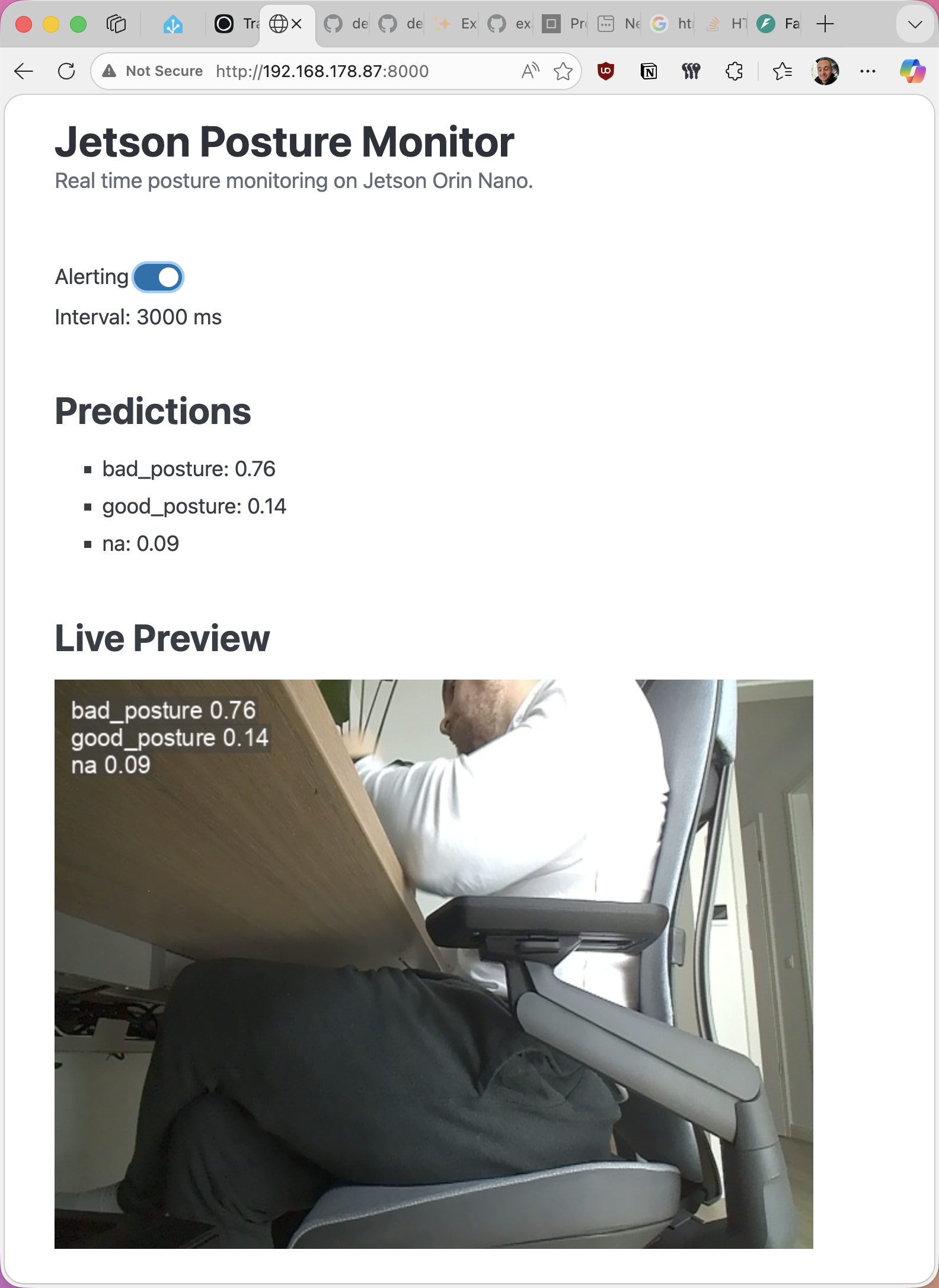
The UI is a single HTML file with PicoCSS taking case of basic CSS styling (so I don't have to). It is also served via FastAPI.
app.mount("/static", StaticFiles(directory="static"), name="static")

@app.get("/")
async def index():
    return FileResponse("static/index.html")
FastAPI serving web UI in main.py
The web UI fetches and controls the alerting status using the API endpoints I created before. It also receives new inference results together with the live preview image via the websocket connection.
MacOS application
As mentioned before, I already have a Python-based MacOS application using rumps for timer-based posture reminders, so I expanded that to include alerts from the Jetson Posture Monitor. I won't go into detail or the source code as part of this blog post.
 denishartl
The app lives in the MacOS menu bar, indicating it's status.
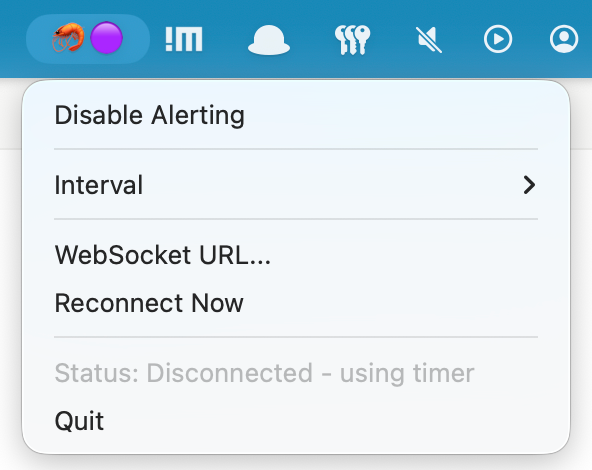
- 🦐 🟢 Connected to server, alerting enabled
- 🦐 🟣 Disconnected, using timer fallback
- 🦐 🔴 Alerting disabled
On startup, the app gets the alerting status (enabled or disabled) from the Jetson server via API. Subsequent changes to alerting are synced between server and the app. When the alerting status gets disabled on the server side, it also changes for the client. My goal was to keep the server as the "master" regarding alerting status to handle client disconnects and also the use of multiple Macbooks more gracefully.
Alerts from the server are sent via websocket to the client app. When the receives an alert notification, it creates an alert as a MacOS notification, along with some funny text.
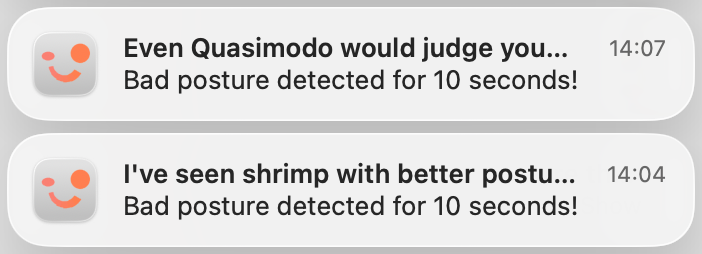
Because I won't be using my Mac only at my desk and also while on the go, I kept the timer based notifications as a fallback. These can either be activated manually or automatically when the application detects a websocket disconnect.
Background process on the Jetson Orin Nano
The last piece to bring it all together was to make the Python application run as a background service on the Jetson.
To do so, I first copied all relevant files into /opt/jetson-posture-monitor. I wanted to keep this directory separate, so I can still work on the project files while the service is running.
sudo mkdir /opt/jetson-posture-monitor
sudo cp ~/private/jetson-posture-monitor/*.py /opt/jetson-posture-monitor
sudo cp -r ~/private/jetson-posture-monitor/static/ /opt/jetson-posture-monitor
sudo cp -r ~/private/jetson-posture-monitor/models/ /opt/jetson-posture-monitor
Create working directory for the background service and copy required files
Next I created the systemd unit file in /etc/systemd/system/posture-monitor.service:
[Unit]
Description=Jetson Posture Monitor
After=network.target

[Service]
Type=simple
User=hartlden
WorkingDirectory=/opt/jetson-posture-monitor
ExecStart=/usr/bin/python3 -m uvicorn main:app --host 0.0.0.0 --port 8000
Restart=always
RestartSec=10

[Install]
WantedBy=multi-user.target
systemd unit file for jetson-posture-monitor
Finally I just had to enable and start the service:
sudo systemctl enable jetson-posture-monitor
sudo systemctl start jetson-posture-monitor
Starting the systemd jetson-posture-monitor service
Initially the service failed to start:
● jetson-posture-monitor.service - Jetson Posture Monitor
Loaded: loaded (/etc/systemd/system/jetson-posture-monitor.service; enabled; vendor preset: enabled)
Active: activating (auto-restart) (Result: exit-code) since Wed 2026-01-07 18:19:58 CET; 3s ago
Process: 145190 ExecStart=/usr/bin/python3 -m uvicorn main:app --host 0.0.0.0 --port 8000 (code=exited, status=1/FAILURE)
Main PID: 145190 (code=exited, status=1/FAILURE)
CPU: 29ms
systemd output for failed service start
This was because the service isn't running within the Python virtual environment I used during development. So I had to install the required packages:
pip3 install -r requirements.txt
pip3 install ultralytics --no-deps
pip3 install torch torchvision --index-url=https://pypi.jetson-ai-lab.io/jp6/cu126
Installing requirements for service
Now the service was able to start successfully and everything worked 🎉
Errors and knowledge nuggets
Here are some things I learned along the way and some interesting errors I ran into during this project.
Debugging uvicorn applications in VSCode
This was my first time using uvicorn, so I needed to find a way how I could use VSCode's debugging feature for this uvicorn app.
The solution was to configure the .vscode/launch.json file:
{
    "version": "0.2.0",
    "configurations": [
        {
            "name": "Debug Uvicorn",
            "type": "debugpy",
            "request": "launch",
            "module": "uvicorn",
            "args": ["main:app", "--host", "0.0.0.0", "--port", "8000", "--reload"],
            "cwd": "${workspaceFolder}"
        }
    ]
}
launch.json file for uvicorn debugging
This tells the debugger to use uvicorn to launch the application. With this in place, the app can be debugged by simply pressing F5.
💡 The --reload parameter is also super helpful here. This tells uvicorn to automatically restart the server on code changes, saving you the extra step to constantly stop and start the server during development and testing.Gstreamer frame buffer filling up and inference delay
When I initially put the inference loop inside of the application, I had an issue where the inference loop would get delayed, with the delay increasing as time went on.
This was, because I had the frame capture running at 30 FPS, but inference only happening ever 3 seconds. This caused the gstreamer frame buffer of captured, but not yet processed frames, to fill up very quickly. For example, after just 10 seconds, inference was processing the 3rd frame, while there were already 90 frames in the buffer.
The solution was to add these parameters to the gstreamer pipeline, allowing it to drop unused frames and keep the buffer small:
appsink drop=true max-buffers=1gstreamer pipeline parameters to avoid buffer fillup
This is what the entire gstreamer pipeline looks like after the change:
def gstreamer_pipeline(
    capture_width=640,
    capture_height=480,
    framerate=30,
    flip_method=2,
):
    return (
        "nvarguscamerasrc ! "
        "video/x-raw(memory:NVMM), "
        "width=(int)%d, height=(int)%d, "
        "format=(string)NV12, framerate=(fraction)%d/1 ! "
        "nvvidconv flip-method=%d ! "
        "video/x-raw, width=(int)%d, height=(int)%d, format=(string)BGRx ! "
        "videoconvert ! "
        "video/x-raw, format=(string)BGR ! appsink drop=true max-buffers=1"
        % (capture_width, capture_height, framerate, flip_method, capture_width, capture_height)
    )
gstreamer pipeline
Server app not responding and unable to stop
During the implementation of the inference loop I ran into an issue where I couldn't stop or interrupt the application anymore. Couldn't cancel with CTRL+C or even kill it with sudo kill <PID>. The only thing which worked was to force kill the process with sudo kill -9 <PID>. The web UI etc. also weren't working then.
This was because I did not give the app/kernel a chance to process other instructions during the inference loop. I had it looping constantly, but was missing one very crucial command at the end of each loop:
await asyncio.sleep(0.1)Adding this little sleep timer at the end of the inference loop gives the kernel time to process other commands and processes like interrupts, but also web requests and everything else.
Further improvements
Some ideas for future improvements:
- Dynamic inference speed: Currently inference runs at a set speed (once every three seconds), even when the web UI is open. This means the picture in the web UI also only updates every three seconds. This could be improved by having a fast inference speed whenever someone actively looks at the output, slowing down again when no one is watching.
- Websocket efficiency improvements: Every connected websocket client gets sent every websocket message there is as of now. The MacOS client gets every inference update with image, the web UI gets every alert. This could be improved by only sending websocket messages to those recipients which need them, improving efficiency and reducing overhead.
- HTTPS and encryption: There is no security or encryption built into this application anywhere right now. This could absolutely be improved, but for my use case (everything happens witin my local network) and the early stage of all of this, I am fine without for now.
- Logging, observability and reliability: Things like proper logging, metric observability, graceful restarts and such could absolutely be added. As with HTTPS, I am fine without for now given the early stage of this application.
Bye
I had so much fun during this part of the project. It was really satisfying to see the individual steps come to live, working, and eventually working together.
From implementing the FastAPI framework with inference running as a background job, to implementing websocket connectivity and the web UI, to integrating everything into the Python application, this felt super rewarding.
I learned a lot about general Python application structure and also websocket connections for real-time connections and data exchange between clients and servers.
Have you built anything similar with the Jetson? I would love to hear your thoughts in the comments ❤️
If you like what you've read, I'd really appreciate it if you share this post. 🔥
Until next time! 👋
Further reading
- Project GitHub repository: https://github.com/denishartl/jetson-posture-monitor
- PostureCheck MacOS app GitHub repository: https://github.com/denishartl/PostureCheck
- FastAPI: https://fastapi.tiangolo.com/