AI Sitting Posture Detection with NVIDIA Jetson Orin Nano: Model Training and Preparation (Part 1)
Train a custom YOLO model for sitting posture detection on Jetson Orin Nano. Includes data collection, training, TensorRT optimization, and full GitHub code.

Learn how I trained a custom YOLO classification model to detect bad sitting posture on the NVIDIA Jetson Orin Nano.
This post continues my journey with the Jetson and also AI workloads. During this journey, I am taking you along my learning experience about running AI workloads, and just "getting into AI" in general. I will be sharing my experiences, learnings, challenges I encountered, and everything in between. In the last post I got my feet wet with running Ultralytics YOLO vision models on the Jetson. You can find it here:
 Denis Hartl
This post will be the first in a series of posts where I work on an AI application looking at my posture while sitting, alerting me when I start to slouch or sit with bad posture. The focus for this first post will be on selecting and training a YOLO vision model to be used in the application. The goal is to end up with a model which can accurately detect whether I am sitting with good or bad posture.
In this post I will show the process of how an AI beginner approaches such a task, trains and evaluates a model. I will share my insights as well as the problems and questions I run into during this process.
Project introduction and goal
I've been struggling with my sitting posture since forever now. Whenever I am working at a desk - of which I do a lot - I just cannot sit straight with good posture. I keep shifting around, sitting cross legged or even sitting uneven, leaning and putting strain on one side of my body. I also slide down my chair a lot, "shrimping" in the chair.
While shifting around while sitting isn't bad per se, I do think that these ways in which I am sitting aren't healthy either. I'd much rather sit straight with good form while sitting, and then switch it up with my standing desk throughout the day.
That's where the first project I want to do with the Jetson comes in: Detect whenever I am sitting in a "bad" position and send alerts whenever I do.
As of now, I have planned four parts for this project:
- Part 1: Model training and preparation (this post!)
- Part 2: Web UI and alerting
- Part 3: Implementing a continuous learning cycle with human feedback to improve the model even further over time
- Part 4: Increasing efficiency by using a lightweight person detection model as a pre-filter, only running the posture detection model when a person is present
Every blog post about this project can be found here.
All code for this project and mentioned in the following blog post can be found here.
In my last post about the Jetson I explored different capabilities of YOLO vision models (read the post here). When I first took a look at the pose estimation capability, I instantly had to think about this project. So this is, where we will start with this project. Let's dive in! 🚴
Camera setup
Before actually starting to monitor my posture, I had to find a way where a camera could even monitor my posture. I initially had the Jetson set up on my desk below my monitor, and its camera along with it.
That left me with the problem, that the Jetson was looking directly at me. Not very useful, if I want to detect when I have bad sitting posture. Most of that happens below the desk.
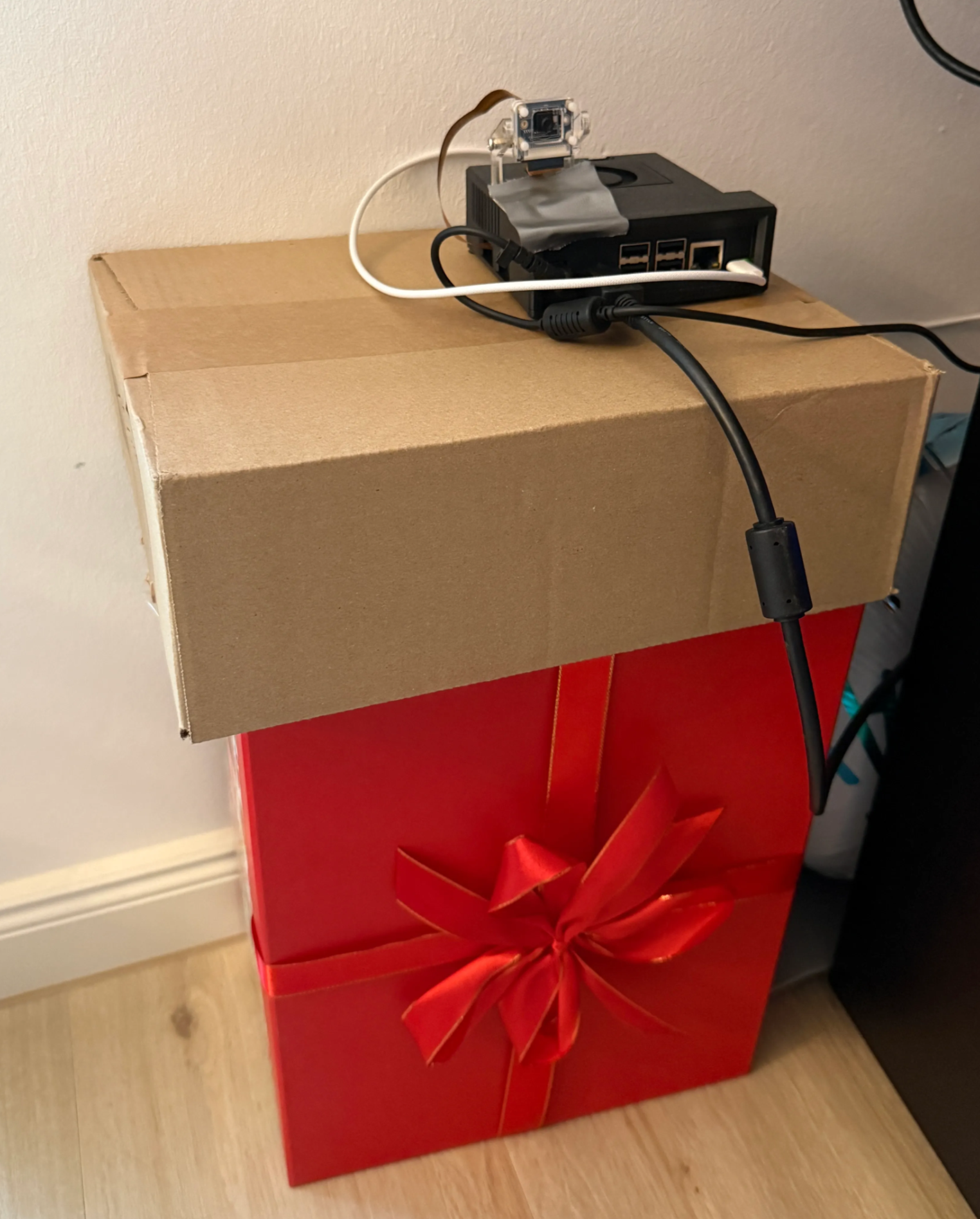
So I decided to set up a very professional rig (aka some cardboard boxes) for the Jetson, where it can watch me and the lower half of my body from the side. The camera angle now looks like this:
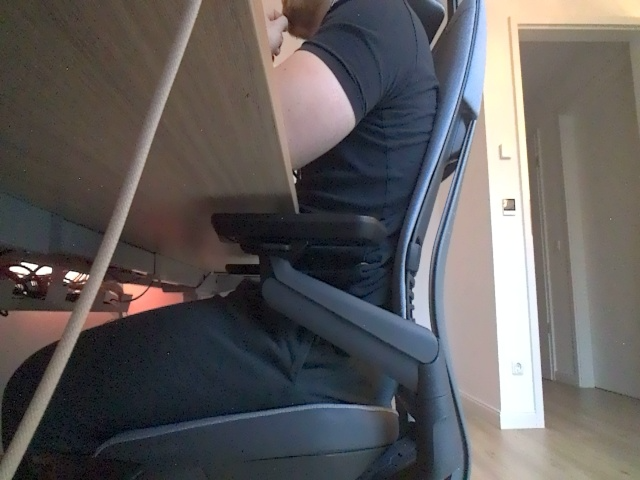
I hope that this angle will work for my purpose. After thinking through this project idea a bit, I think one of the main ways to detect bad sitting posture will be to monitor if there is a gap between my lower back and the chair. This angle should get a good look at this, along with my legs to see if I sit cross-legged.
This is what the very professional Jetson setup looks like for this project:
YOLO pose estimation for posture detection
With the camera setup out of the way, let's get into the actual posture monitoring using YOLO. As mentioned before, my first idea for this project was to use the YOLO pose estimation capability to take a look at my posture, calculate the relation/angle between things like my shoulders, hips and knees, and use that information to detect whenever I am slouching.
I used the following code to set up the model and to get its prediction output live within my Jupyter Notebook.
# Basic pose detection from the side

cap = cv2.VideoCapture(gstreamer_pipeline(), cv2.CAP_GSTREAMER)
model = YOLO("models/yolo11x-pose.pt")

# Prepare for FPS calculation
freq = cv2.getTickFrequency()

try:
    while True:
        # Get start tick for FPS calculation
        t1 = cv2.getTickCount()

        # Read frame
        ret, frame = cap.read()
        if not ret:
            break

        # Run detection
        results = model(frame, verbose=False)
        annotated = results[0].plot()

        # Add FPS to frame
        t2 = cv2.getTickCount()
        time1 = (t2-t1)/freq
        frame_rate_calc = 1/time1
        annotated_with_fps = cv2.putText(annotated,
                                        f'FPS: {frame_rate_calc:.2f}',
                                        (5, 630),
                                        cv2.FONT_HERSHEY_SIMPLEX,
                                        0.5,
                                        (255, 0, 0),
                                        1,
                                        cv2.LINE_AA)

        # Convert to JPEG bytes for display
        _, jpeg = cv2.imencode('.jpg', annotated_with_fps)

        # Display in notebook
        clear_output(wait=True)
        display(Image(data=jpeg.tobytes()))

except KeyboardInterrupt:
    pass
finally:
    cap.release()
Very excited to see the first results, I fired up the model and was .. disappointed. The detection was all over the place. Multiple persons were being detected and keypoint detection within my body worked very poorly. I even used the yolo11x-pose model opposed to yolo11n-pose or yolo11s-pose with the hopes of getting better detection, but this sadly didn't change much.
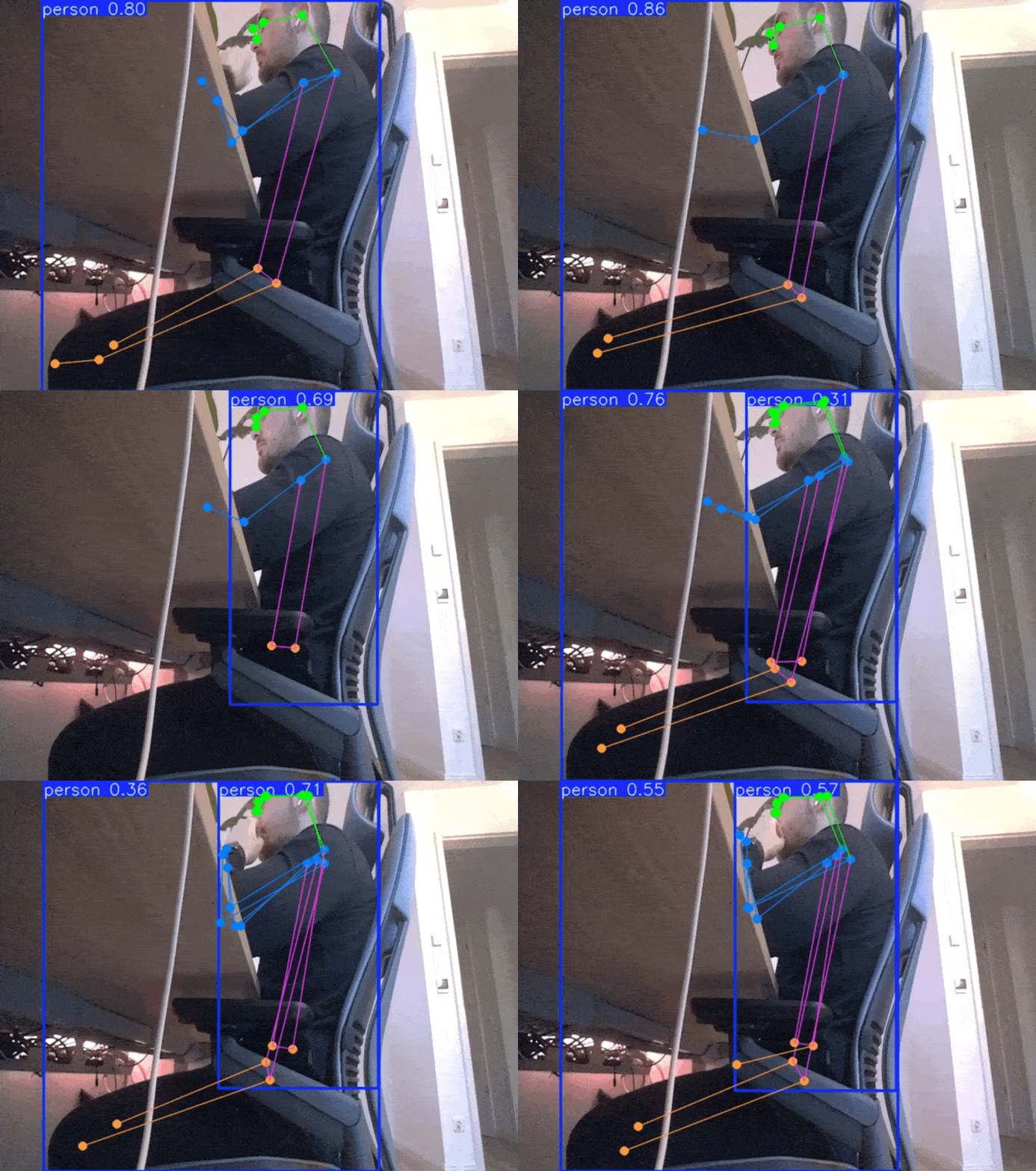
I think the fact that the model can only see parts of my body from the side, combined with the chair and the unusual position, was too much for the model - understandably so. With this, my first idea of using posture detection was scrapped and I needed an alternative.
YOLO image classification for posture detection
My next idea of getting this project to work was using image classification. Remembering from the first post where I explored YOLO's capabilities, whole images are classified as one to identify what is going on. So my thought was as follows:
What if I could train a model what good sitting posture and bad sitting posture looks like and use that model to then monitor my sitting posture in real time?
With this new idea and goal in mind, I set off.
My use case - looking at a person from the side to judge their sitting posture - obviously isn't something a model will be pre-trained on. So I needed to train my own model. And for that I needed data. As much data as possible, and of different scenarios. Good sitting form, bad sitting form, me standing at my desk, and so on.
Data collection and classification
To start with training image data collection, I wrote a Python script I can run on the Jetson. It uses a YOLO object detection model to detect whenever a person is present. If a person is present, it takes a picture every three minutes. This is to get as much training data as possible of me sitting at the desk. When there is no person present, the script captures an image every hour. I decided to also include images like that, to make the model respond properly in these cases. After all, I won't be sitting at my desk 24/7. Here is the script:
"""
Capture images to gather training data. Object detection continuously monitors if a person is present.
If person is present: Take a picture every three minutes
If no person is present: Take a picture every hour (to also get training data of no person sitting at the desk)
"""

import cv2
import time
import sys
import datetime
from IPython.display import display, Image, clear_output
from ultralytics import YOLO

# Prepare gsteamer pipeline for Jetson camera
def gstreamer_pipeline(
    capture_width=640,
    capture_height=480,
    framerate=30,
    flip_method=2,
):
    return (
        "nvarguscamerasrc ! "
        "video/x-raw(memory:NVMM), "
        "width=(int)%d, height=(int)%d, "
        "format=(string)NV12, framerate=(fraction)%d/1 ! "
        "nvvidconv flip-method=%d ! "
        "video/x-raw, width=(int)%d, height=(int)%d, format=(string)BGRx ! "
        "videoconvert ! "
        "video/x-raw, format=(string)BGR ! appsink"
        % (capture_width, capture_height, framerate, flip_method, capture_width, capture_height)
    )

ft = "%Y-%m-%dT%H:%M:%S%z"  # DateTime format for output
model = YOLO("models/yolo11m.pt")  # Load model for person detection

cap = cv2.VideoCapture(gstreamer_pipeline(), cv2.CAP_GSTREAMER)

# Warm-up: discard first ~30 frames to let auto-exposure stabilize
for _ in range(30):
    cap.read()

last_save = 0

try:
    while True:
        person_count = 0
        ret, frame = cap.read()
        results = model(frame, verbose=False)
        if not ret:
            break

        # Get amount of persons in current frame
        for r in results:
            boxes = r.boxes
            for box in boxes:
                cls = int(box.cls[0])
                conf = float(box.conf[0])
                # Only keep class 'person' (COCO class id 0)
                if cls == 0 and conf > 0.5:
                    person_count += 1

        # Set interval depending on if person is present
        interval = 180 if person_count > 0 else 3600

        now = time.time()
        if now - last_save >= interval:
            # Save the image if interval has passed since last image
            t = datetime.datetime.now().strftime(ft)
            cv2.imwrite(f'/home/hartlden/private/jetson-posture-monitor/dataset/uncategorized/image-{t}.jpg', frame)
            print(f"Saved image at {t}, persons detected: {person_count}")
            last_save = now

except KeyboardInterrupt:
    pass
finally:
    cap.release()
I let this script run for a while to collect the first batch of training images.
With the training images collecting, I now was thinking about the format in which the training data needed to be in. After some initial research, I found tools like CVAT and Label Studio, eventually trying out Label Studio. I tried to annotate some images and export them, but was not able to export in YOLO compatible format (according to the tool). I then realized, that I don't even know, what YOLO compatible format is.
After some more research, I eventually found the this YouTube video from Computer vision engineer showcasing how training images can simply be structured in a directory tree, with one folder representing each class I want to detect.
Now that I know in which format the data needs to be prepared, I created this folder structure:
.
├── train
│   ├── bad_posture
│   ├── good_posture
│   └── na
├── uncategorized
└── val
    ├── bad_posture
    ├── good_posture
    └── na
Images in folder bad_posture represent me sitting with bad posture (e.g. slouched, cross-legged), good_posture is me sitting with proper posture, and na are images which do not represent me sitting in the desk (e.g. just being in the room, rolled over to my girlfriends desk, ...). Newly captured images from the capture script go into uncategorized.
To move the images to their correct folder (e.g. their class they belong to), I wrote a Python code snippet which shows me each image one at a time, and prompts me for the class it belongs to (see the red highlight in the screenshot below). Depending on my answer, the image gets moved to the correct folder. I also implemented a random split (90/10) between training and validation data to ensure the model is evaluated on images it hasn't seen during training. This approach lets me classify the training images very quickly and directly within Jupyter Notebook.
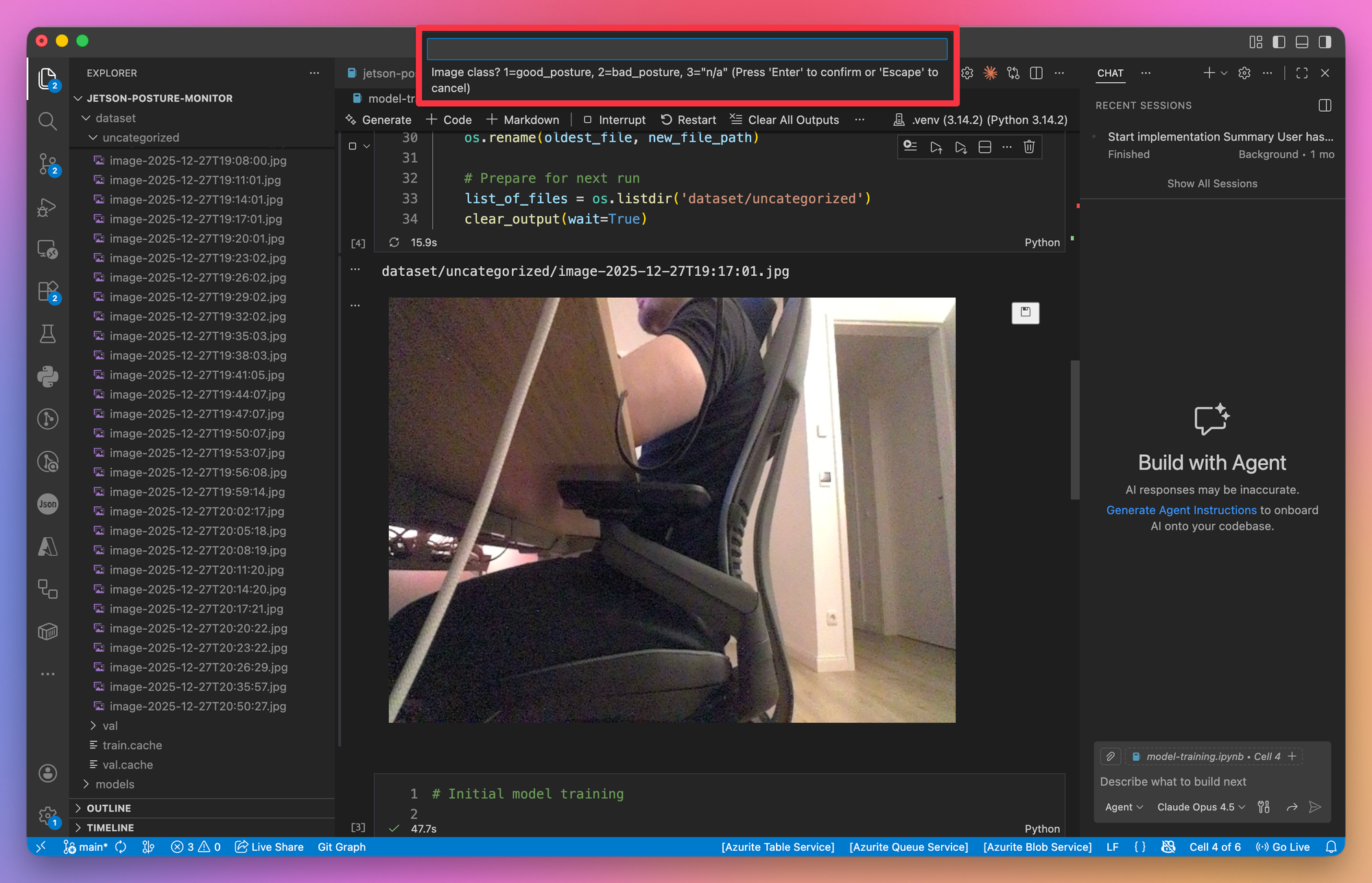
This is the code snippet for the categorization:
# Image classification

# Get the oldest image in uncategorized
list_of_files = os.listdir('dataset/uncategorized')
while len(list_of_files) > 0:
    full_path= ["dataset/uncategorized/{0}".format(x) for x in list_of_files]

    oldest_file = min(full_path, key=os.path.getctime)
    print(oldest_file)

    # Display image
    display(Image(oldest_file))

    # Get user input
    user_input = ""
    while user_input not in ["1", "2", "3"]:
        user_input = input('Image class? 1=good_posture, 2=bad_posture, 3="n/a"')

    # Get a random number for split between train and val
    random_num = random.random()

    # Set train/val and class folders
    new_folder = "train" if random_num <= 0.9 else "val"  # randomly split images between train and val
    user_input_folder = "good_posture" if user_input == "1" else "bad_posture" if user_input == "2" else "na"

    # Construct new file path
    new_file_path = f"dataset/{new_folder}/{user_input_folder}/{oldest_file.split('/')[-1]}"

    # Move file
    os.rename(oldest_file, new_file_path)

    # Prepare for next run
    list_of_files = os.listdir('dataset/uncategorized')
    clear_output(wait=True)
Training the YOLO classification model
With the training data prepared, it was time to start training.
Initially I wanted to train the model directly on the Jetson. I quickly ran into issues with insufficient memory however. I got errors like this:
NvMapMemAllocInternalTagged: 1075072515 error 12
NvMapMemHandleAlloc: error 0
NvMapMemAllocInternalTagged: 1075072515 error 12
NvMapMemHandleAlloc: error 0
To work around these issues, I first tried to disable the GUI on the Jetson. This freed up about ~800MB of RAM. This command can be used to disable the GUI:
sudo systemctl set-default multi-user.targetSadly, this was still not enough. I eventually got the model to train with a batch size of just 1, but quickly found out, that this would not make sense for now. Performance was very slow, and I was planning on doing some experimenting and playing around. With the Jetson's limitations, this would take ages. So I switched over to training on my Macbook.
I started my first training run using this code:
# Initial model training

# Load pretrained model
model = YOLO("models/yolo11l-cls.pt")

# Train model
results = model.train(
    data='/Users/hartlden/private/jetson-posture-monitor/dataset',
    epochs=50,  # Going for many epochs, but saving every 10 to evaluate performance
    patience=5,  # Stop if validation doesn't improve for 5 epochs
    imgsz=640,
    save=True,
    batch=16,
    plots=True,
    device="mps"  # Train on Apple Silicon
)
To avoid overfitting, I set the parameter patience=5.
Here is the output of the first training run:
Starting training for 50 epochs...

      Epoch    GPU_mem       loss  Instances       Size
[K       1/50      13.7G     0.8334          6        640: 100% ━━━━━━━━━━━━ 18/18 2.5s/it 45.6s1.5ss
[K               classes   top1_acc   top5_acc: 100% ━━━━━━━━━━━━ 2/2 1.1it/s 1.9s3.8s
                   all      0.784          1

      Epoch    GPU_mem       loss  Instances       Size
[K       2/50      12.6G     0.5076          6        640: 100% ━━━━━━━━━━━━ 18/18 2.1s/it 38.5s1.5ss
[K               classes   top1_acc   top5_acc: 100% ━━━━━━━━━━━━ 2/2 1.1it/s 1.9s3.9s
                   all      0.863          1

      Epoch    GPU_mem       loss  Instances       Size
[K       3/50      12.6G     0.4084          6        640: 100% ━━━━━━━━━━━━ 18/18 2.2s/it 38.8s1.6ss
[K               classes   top1_acc   top5_acc: 100% ━━━━━━━━━━━━ 2/2 1.1it/s 1.9s3.8s
                   all      0.765          1

      Epoch    GPU_mem       loss  Instances       Size
[K       4/50      12.6G     0.3547          6        640: 100% ━━━━━━━━━━━━ 18/18 2.1s/it 38.6s1.5ss
[K               classes   top1_acc   top5_acc: 100% ━━━━━━━━━━━━ 2/2 1.1it/s 1.9s3.9s
                   all      0.725          1

      Epoch    GPU_mem       loss  Instances       Size
[K       5/50      12.6G     0.2975          6        640: 100% ━━━━━━━━━━━━ 18/18 2.1s/it 38.0s1.5ss
[K               classes   top1_acc   top5_acc: 100% ━━━━━━━━━━━━ 2/2 1.1it/s 1.8s3.7s
                   all      0.824          1

      Epoch    GPU_mem       loss  Instances       Size
[K       6/50      12.6G     0.3521          6        640: 100% ━━━━━━━━━━━━ 18/18 2.2s/it 38.8s1.5ss
[K               classes   top1_acc   top5_acc: 100% ━━━━━━━━━━━━ 2/2 1.0it/s 1.9s3.9s
                   all      0.863          1

      Epoch    GPU_mem       loss  Instances       Size
[K       7/50      12.6G      0.451          6        640: 100% ━━━━━━━━━━━━ 18/18 2.1s/it 38.6s1.5ss
[K               classes   top1_acc   top5_acc: 100% ━━━━━━━━━━━━ 2/2 1.1it/s 1.8s3.8s
                   all      0.765          1
[34m[1mEarlyStopping: [0mTraining stopped early as no improvement observed in last 5 epochs. Best results observed at epoch 2, best model saved as best.pt.
To update EarlyStopping(patience=5) pass a new patience value, i.e. `patience=300` or use `patience=0` to disable EarlyStopping.

7 epochs completed in 0.082 hours.
Optimizer stripped from /Users/hartlden/private/jetson-posture-monitor/runs/classify/train2/weights/last.pt, 25.9MB
Optimizer stripped from /Users/hartlden/private/jetson-posture-monitor/runs/classify/train2/weights/best.pt, 25.9MB

Validating /Users/hartlden/private/jetson-posture-monitor/runs/classify/train2/weights/best.pt...
Ultralytics 8.3.241 🚀 Python-3.14.2 torch-2.9.1 MPS (Apple M1 Pro)
YOLO11l-cls summary (fused): 94 layers, 12,822,275 parameters, 0 gradients, 49.3 GFLOPs
[34m[1mtrain:[0m /Users/hartlden/private/jetson-posture-monitor/dataset/train... found 278 images in 3 classes ✅
[34m[1mval:[0m /Users/hartlden/private/jetson-posture-monitor/dataset/val... found 51 images in 3 classes ✅
[34m[1mtest:[0m None...
[K               classes   top1_acc   top5_acc: 100% ━━━━━━━━━━━━ 2/2 1.2it/s 1.7s3.3s
                   all      0.863          1
Speed: 0.8ms preprocess, 12.4ms inference, 0.0ms loss, 0.0ms postprocess per image
Results saved to [1m/Users/hartlden/private/jetson-posture-monitor/runs/classify/train2[0m
Evaluating the YOLO classification model
According to the output, we already got the best result at epoch 2, achieving an accuracy of about ~86% on the validation part of the dataset. I am not sure yet if makes sense that the best model was found so soon. Maybe it does, because I think the complexity of what I am doing here is pretty low overall.
By setting plots=True we get some handy plots of the model training we can take a look at.
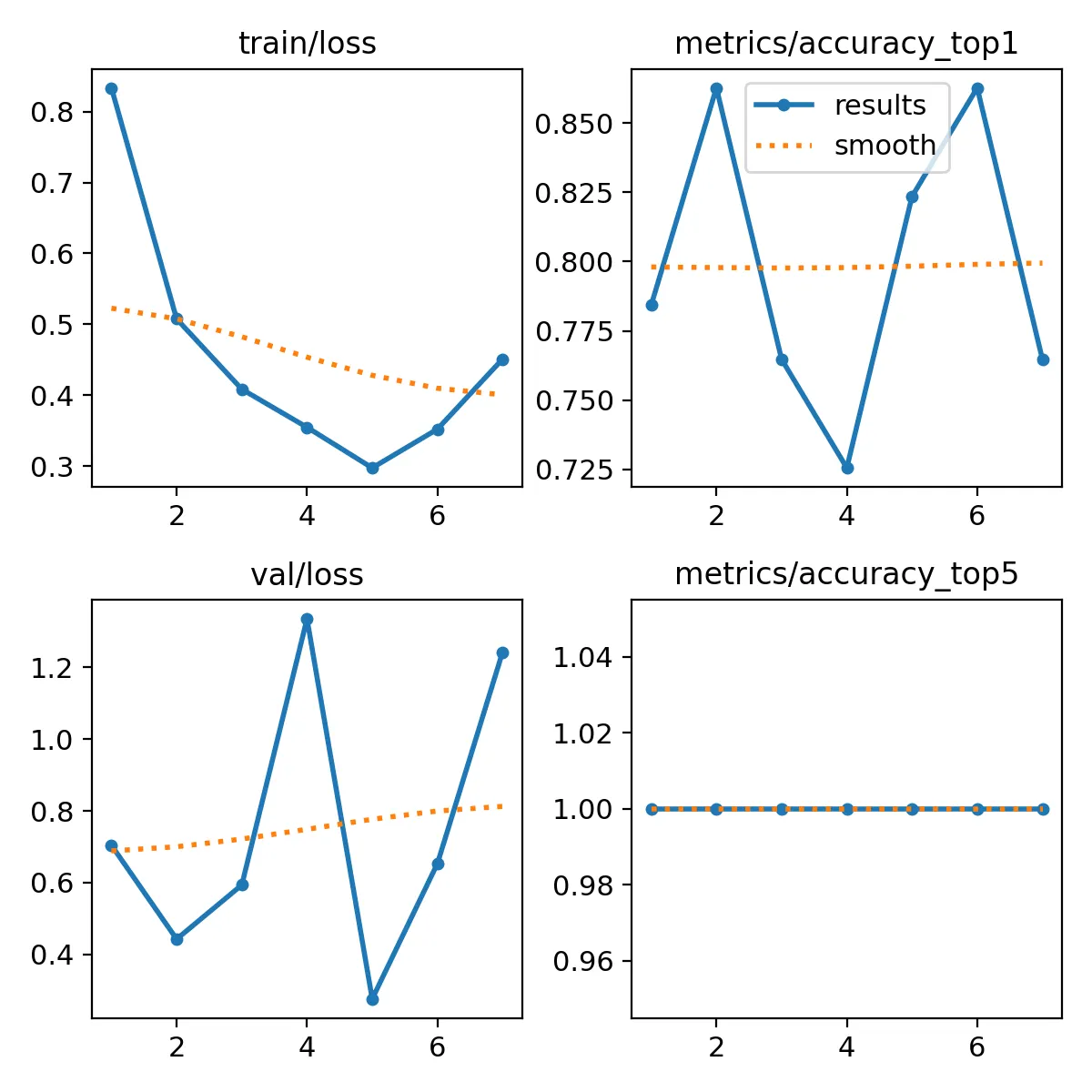
The first thing I noticed when looking at these plots was: “I don’t know what any of those metrics mean 😱”.
After some research, I found out that YOLO uses the Cross-Entropy Loss function for classification problems. From my understanding so far, this means that the loss function above gives an indication of how the model performs (predictions) in comparison with the actual values of an image class.
Cross-Entropy Loss is logarithmic, so the model gets penalized depending on it’s confidence. If a model makes an wrong prediction with low confidence, the penalty is lesser compared to the model making a wrong prediction with high confidence.
Looking at the plots, the model achieved it’s lowest loss at epoch 5, but combined with lower accuracy than epoch 2.
YOLO also outputs samples of the images it uses for training.
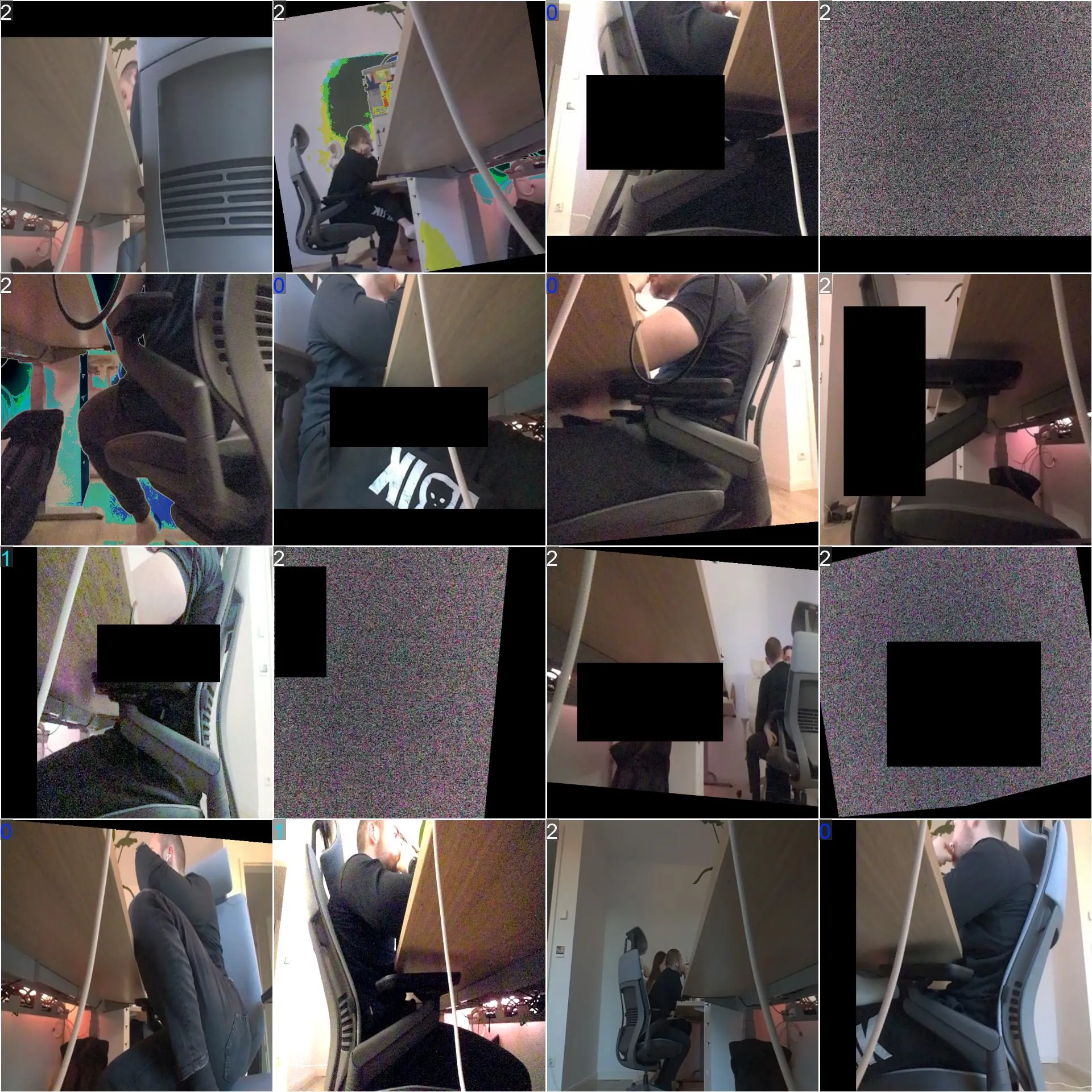
I immediately noticed the many black boxes and other distortions in these images. This is all done as part of the process of data augmentation, where a set of alterations is performed on each image. This is designed to help with model generalization, allowing it to work better on previously unseen data.
While this can be helpful, I was wondering if it really is helpful in this project. The image the model will be looking at is pretty static, there will be no black boxes, nor will I be sitting the other way around suddenly. So I decided to try model training without augmentation.
Training the YOLO classification model with data augmentation disabled
I used this code to train the model again without data augmentation:
# Model training without augmentation

# Load pretrained model
model = YOLO("models/yolo11l-cls.pt")

# Train model
results = model.train(
    data='/Users/hartlden/private/jetson-posture-monitor/dataset',
    epochs=50, # Going for many epochs, but saving every 10 to evaluate performance
    patience=5, # Stop if validation doesn't improve for 5 epochs
    imgsz=640,
    save=True,
    batch=16,
    plots=True,
    device="mps", # Train on Apple Silicon
    hsv_h=0.0,
    hsv_s=0.0,
    hsv_v=0.0,
    translate=0.0,
    scale=0.0,
    fliplr=0.0,
    mosaic=0.0,
    erasing=0.0,
    auto_augment=None,
)
Looking at the training output now, we can see that the validation accuracy is much higher:
Starting training for 50 epochs...

      Epoch    GPU_mem       loss  Instances       Size
[K       1/50      13.8G     0.7519          6        640: 100% ━━━━━━━━━━━━ 18/18 2.2s/it 40.5s1.4ss
[K               classes   top1_acc   top5_acc: 100% ━━━━━━━━━━━━ 2/2 1.1it/s 1.9s3.9s
                   all      0.725          1

      Epoch    GPU_mem       loss  Instances       Size
[K       2/50      13.7G     0.2362          6        640: 100% ━━━━━━━━━━━━ 18/18 2.0s/it 36.6s1.4ss
[K               classes   top1_acc   top5_acc: 100% ━━━━━━━━━━━━ 2/2 1.0it/s 1.9s3.9s
                   all      0.941          1

      Epoch    GPU_mem       loss  Instances       Size
[K       3/50      13.7G      0.152          6        640: 100% ━━━━━━━━━━━━ 18/18 2.0s/it 36.6s1.4ss
[K               classes   top1_acc   top5_acc: 100% ━━━━━━━━━━━━ 2/2 1.1it/s 1.9s3.7s
                   all      0.902          1

      Epoch    GPU_mem       loss  Instances       Size
[K       4/50      13.7G     0.1121          6        640: 100% ━━━━━━━━━━━━ 18/18 2.0s/it 35.8s1.4ss
[K               classes   top1_acc   top5_acc: 100% ━━━━━━━━━━━━ 2/2 1.1it/s 1.9s3.7s
                   all      0.824          1

      Epoch    GPU_mem       loss  Instances       Size
[K       5/50      13.7G     0.1112          6        640: 100% ━━━━━━━━━━━━ 18/18 2.0s/it 36.4s1.4ss
[K               classes   top1_acc   top5_acc: 100% ━━━━━━━━━━━━ 2/2 1.0it/s 1.9s3.8s
                   all      0.882          1

      Epoch    GPU_mem       loss  Instances       Size
[K       6/50      13.7G    0.07169          6        640: 100% ━━━━━━━━━━━━ 18/18 2.0s/it 36.8s1.5ss
[K               classes   top1_acc   top5_acc: 100% ━━━━━━━━━━━━ 2/2 1.1it/s 1.9s3.8s
                   all      0.471          1

      Epoch    GPU_mem       loss  Instances       Size
[K       7/50      13.7G     0.2408          6        640: 100% ━━━━━━━━━━━━ 18/18 2.0s/it 36.7s1.4ss
[K               classes   top1_acc   top5_acc: 100% ━━━━━━━━━━━━ 2/2 1.1it/s 1.8s3.9s
                   all      0.843          1
[34m[1mEarlyStopping: [0mTraining stopped early as no improvement observed in last 5 epochs. Best results observed at epoch 2, best model saved as best.pt.
To update EarlyStopping(patience=5) pass a new patience value, i.e. `patience=300` or use `patience=0` to disable EarlyStopping.

7 epochs completed in 0.077 hours.
Optimizer stripped from /Users/hartlden/private/jetson-posture-monitor/runs/classify/train6/weights/last.pt, 25.9MB
Optimizer stripped from /Users/hartlden/private/jetson-posture-monitor/runs/classify/train6/weights/best.pt, 25.9MB

Validating /Users/hartlden/private/jetson-posture-monitor/runs/classify/train6/weights/best.pt...
Ultralytics 8.3.241 🚀 Python-3.14.2 torch-2.9.1 MPS (Apple M1 Pro)
YOLO11l-cls summary (fused): 94 layers, 12,822,275 parameters, 0 gradients, 49.3 GFLOPs
[34m[1mtrain:[0m /Users/hartlden/private/jetson-posture-monitor/dataset/train... found 278 images in 3 classes ✅
[34m[1mval:[0m /Users/hartlden/private/jetson-posture-monitor/dataset/val... found 51 images in 3 classes ✅
[34m[1mtest:[0m None...
[K               classes   top1_acc   top5_acc: 100% ━━━━━━━━━━━━ 2/2 1.2it/s 1.6s3.2s
                   all      0.941          1
Speed: 0.3ms preprocess, 12.5ms inference, 0.0ms loss, 0.0ms postprocess per image
Results saved to [1m/Users/hartlden/private/jetson-posture-monitor/runs/classify/train6[0m
And looking at the plotted training performance, we can see higher accuracy and lower loss across the board.
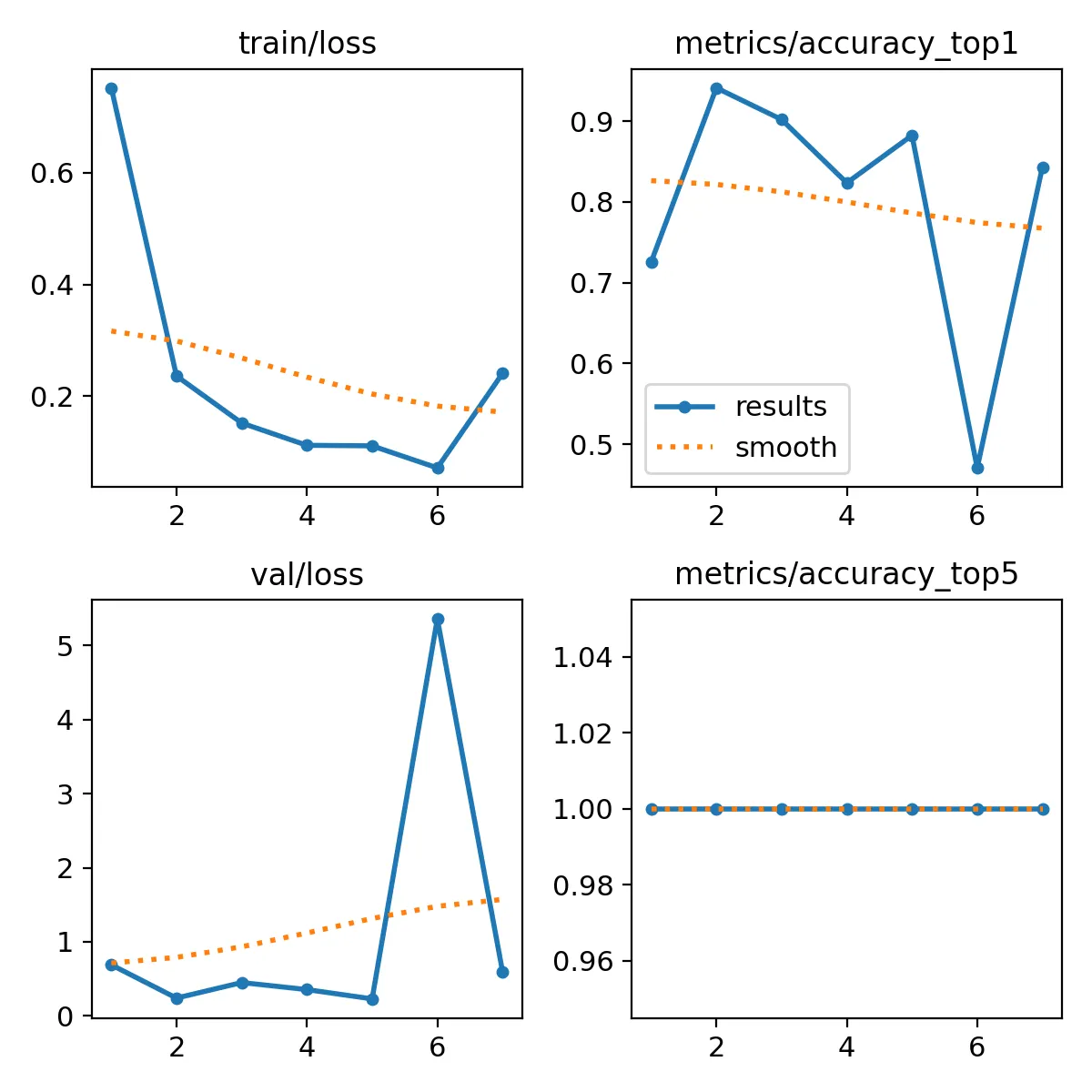
From these results I think it makes sense to not use data augmentation in this use case for the project.
For both training runs so far, the best model apparently was already found on the second epoch. This is because of the patience=5 parameter I set for training. This got me wondering if there could be a better model if we let the training run for longer.
Training for more epochs without data augmentation
To find out if more epochs could help find a better model, I set patience=15 and started another training run without image augmentation.
# Model training without augmentation

# Load pretrained model
model = YOLO("models/yolo11l-cls.pt")

# Train model
results = model.train(
    data='/Users/hartlden/private/jetson-posture-monitor/dataset',
    epochs=50, # Going for many epochs, but saving every 10 to evaluate performance
    patience=15, # Stop if validation doesn't improve for 5 epochs
    imgsz=640,
    save=True,
    batch=16,
    plots=True,
    device="mps", # Train on Apple Silicon
    hsv_h=0.0,
    hsv_s=0.0,
    hsv_v=0.0,
    translate=0.0,
    scale=0.0,
    fliplr=0.0,
    mosaic=0.0,
    erasing=0.0,
    auto_augment=None,
)
I won’t paste the whole output here, but training lasted for 17 epochs before stopping early as there as no improvement being observed. This left me confused. Here is the training output of epoch 2 and epoch 14:
      Epoch    GPU_mem       loss  Instances       Size
[K       2/50      13.7G     0.2362          6        640: 100% ━━━━━━━━━━━━ 18/18 2.0s/it 36.8s1.4ss
[K               classes   top1_acc   top5_acc: 100% ━━━━━━━━━━━━ 2/2 1.1it/s 1.9s3.9s
                   all      0.941          1

      Epoch    GPU_mem       loss  Instances       Size
[K      14/50      13.4G    0.08387          6        640: 100% ━━━━━━━━━━━━ 18/18 2.1s/it 37.7s1.9ss
[K               classes   top1_acc   top5_acc: 100% ━━━━━━━━━━━━ 2/2 1.1s/it 2.1s4.1s
                   all      0.941          1
Looking closely, we can see that both epochs have the same accuracy, but epoch 14 has significantly lower loss. So surely epoch 14 must be better? is what I thought.
YOLO also provides a CSV file with more metrics gathered during training. In there we can see that, while loss on the training data is lower, loss on the validation data isn’t. This basically means that the model has learnt the training data too well and can’t transfer it’s knowledge to previously unseen data. This is also called overfitting.
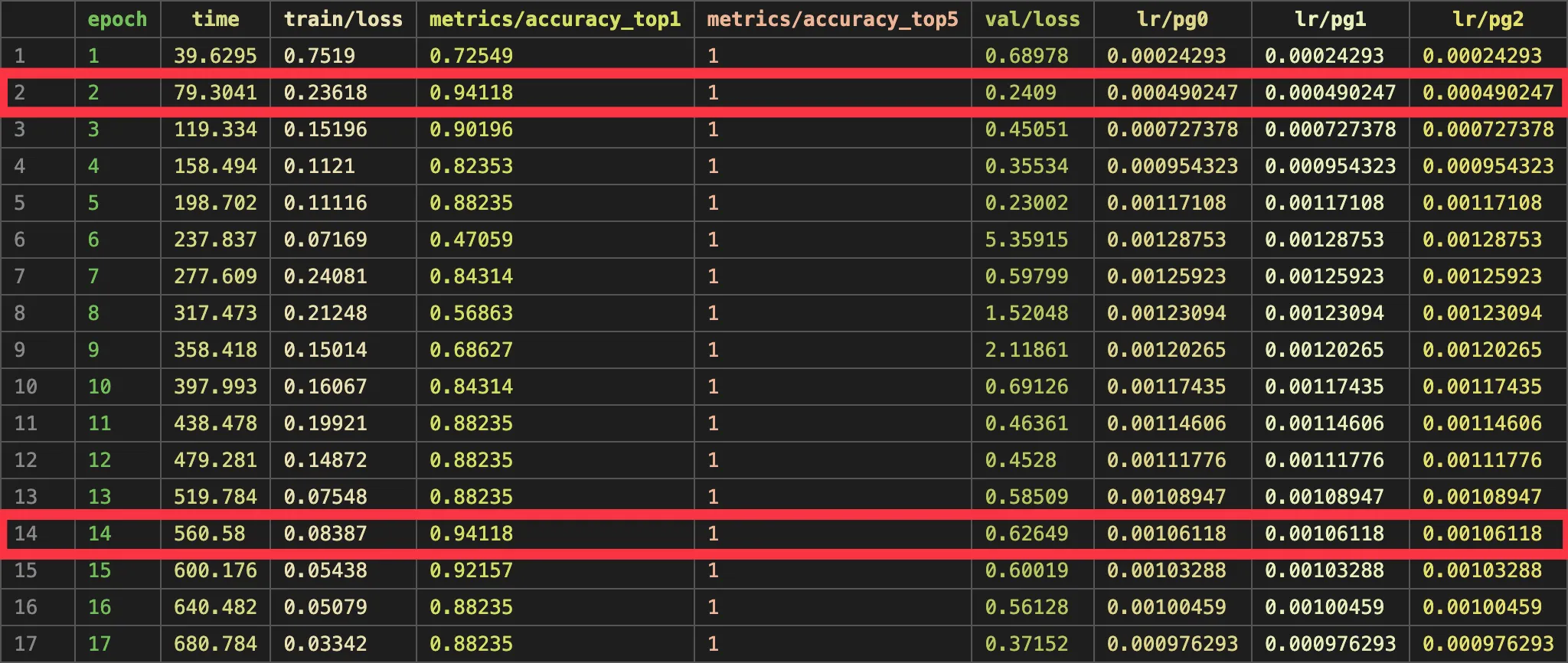
This result got me to think again.
Can performance and reliability be improved, if the model is trained for more epochs but on data with augmentation?
In (my) theory, this should work, because data augmentation is designed to make the model able to generalize and transfer it’s knowledge better.
Training for more epochs with data augmentation
The final test I performed was to train the model on augmented data and for more epochs. I set patience=15 again and let er’ rip.
I will save you from the whole output, but in summary the model trained for 30 epochs before eventually ending early because there was no more improvement being made. The best epoch found was epoch 15:

With about ~98% accuracy and a loss of about ~0.05 on the validation dataset, this seemed like really solid performance. Going forward, I will try to use this model on the Jetson for the actual live posture monitoring.
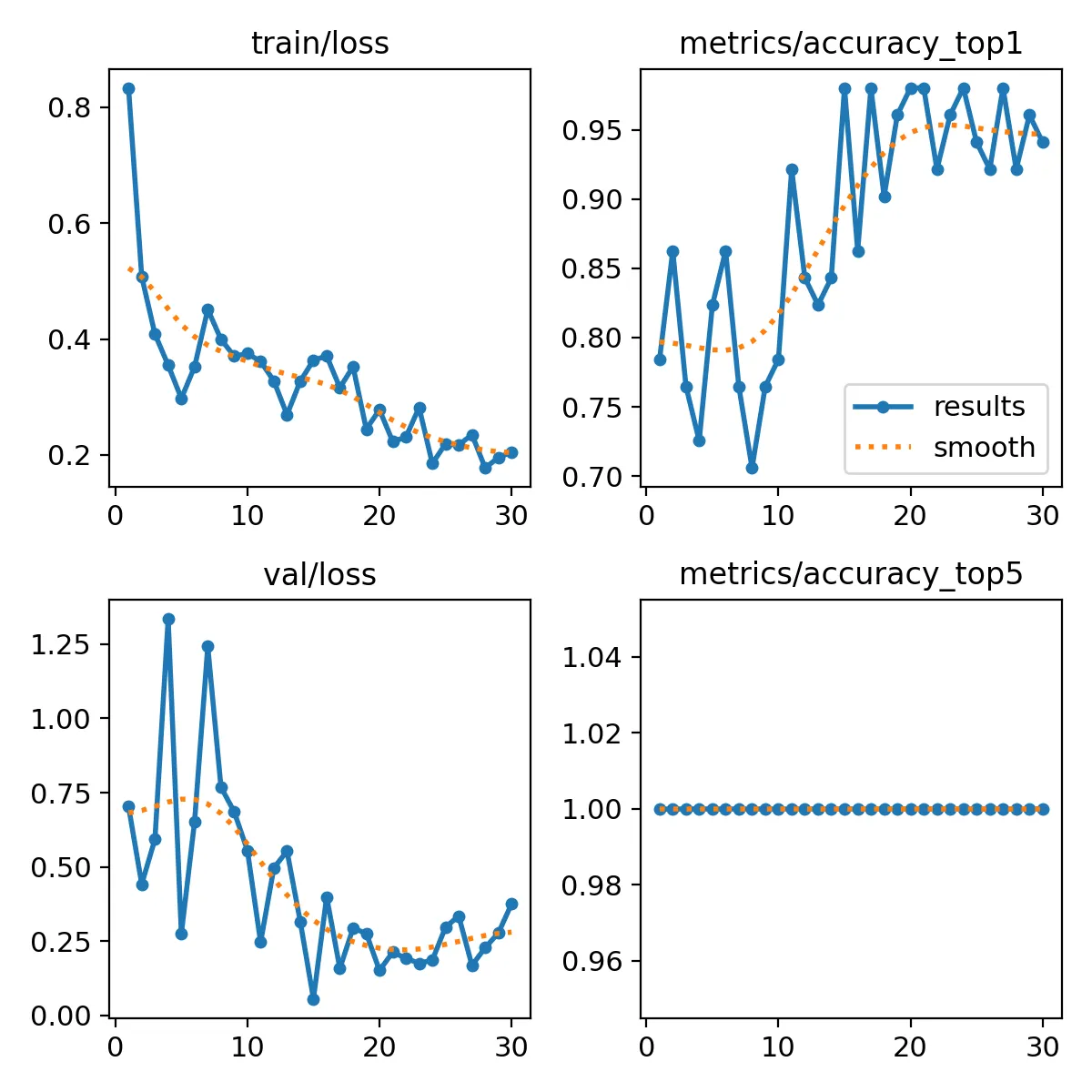
Looking at the plotted metrics, accuracy can be seen evening out towards the end, and validation loss starting to climb. From what I understand, this means that the model was starting to overfit the training data. So it makes total sense that the early stopping triggered and ended model training early.
I am sure there could be even more improvements made by testing different optimizer functions and such, but for now I am really happy with the result.
Testing the model on the NVIDIA Jetson
To see how the model is performing, I loaded it up with this command. This loads the best model trained in the previous step.
model = YOLO("models/trained-with-augmentation.pt")And from the first tests, it seems like it’s working pretty well 🎉. The model detects nicely when I sit straight, cross-legged and also when I leave the desk.
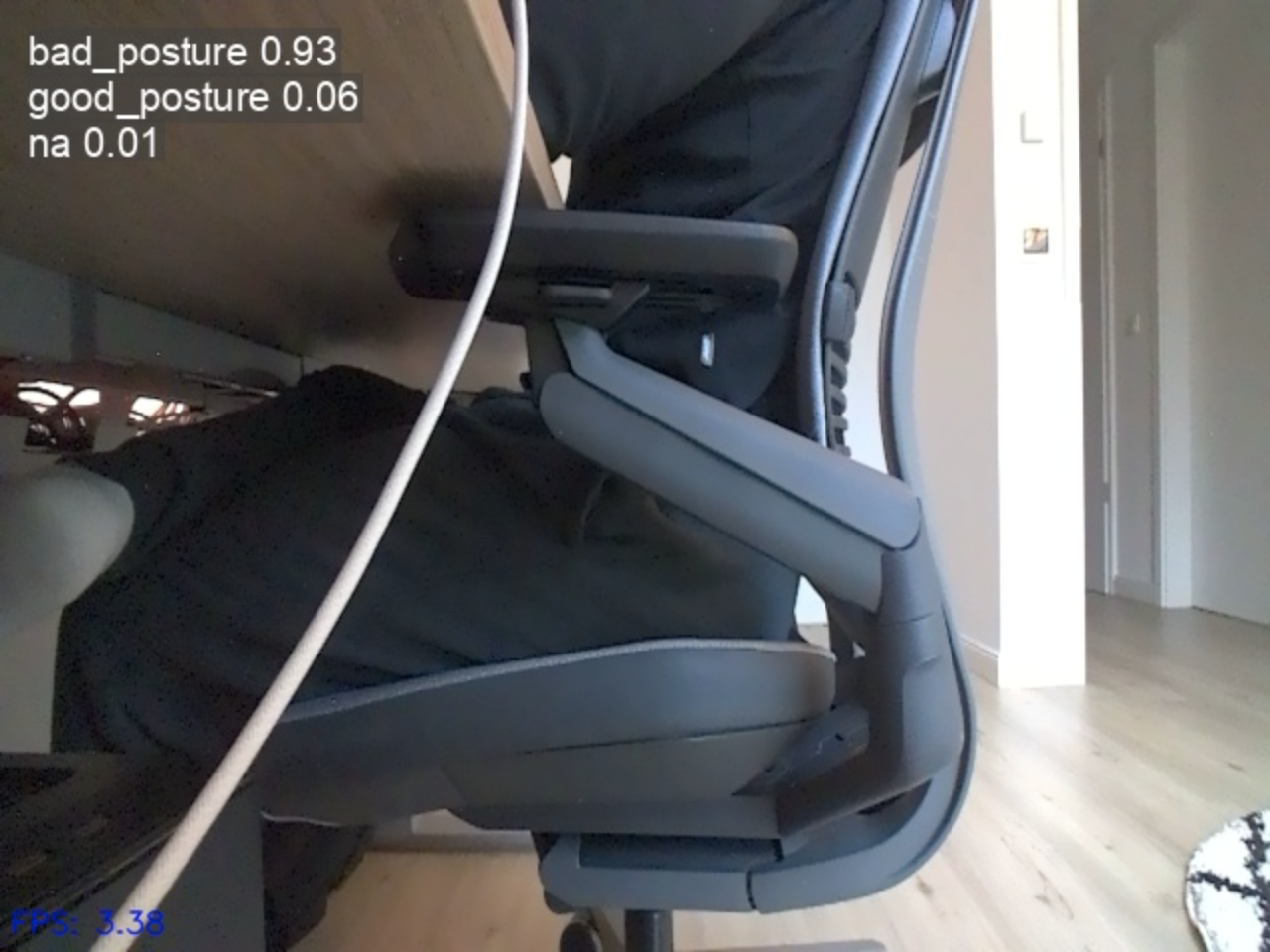
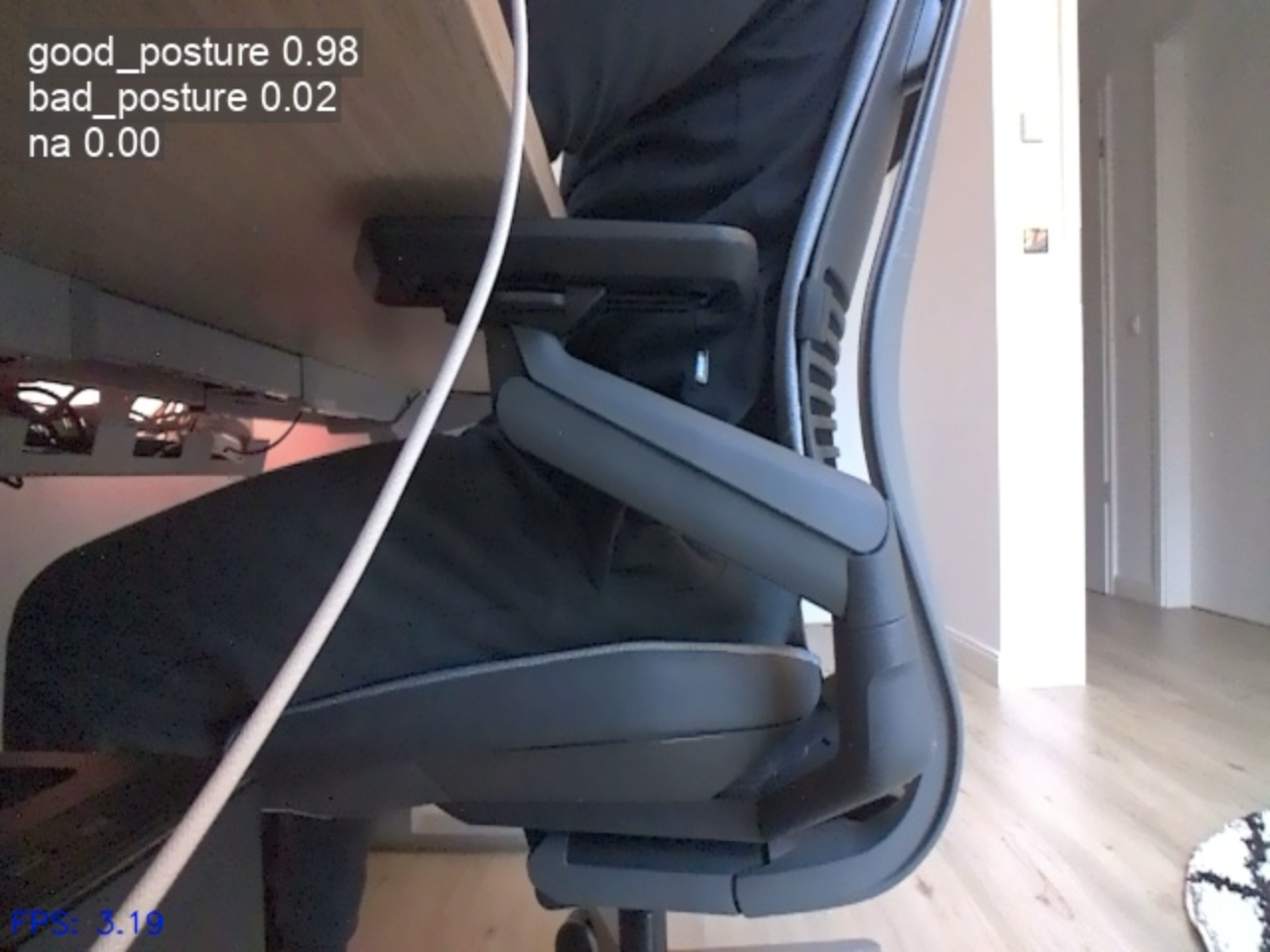
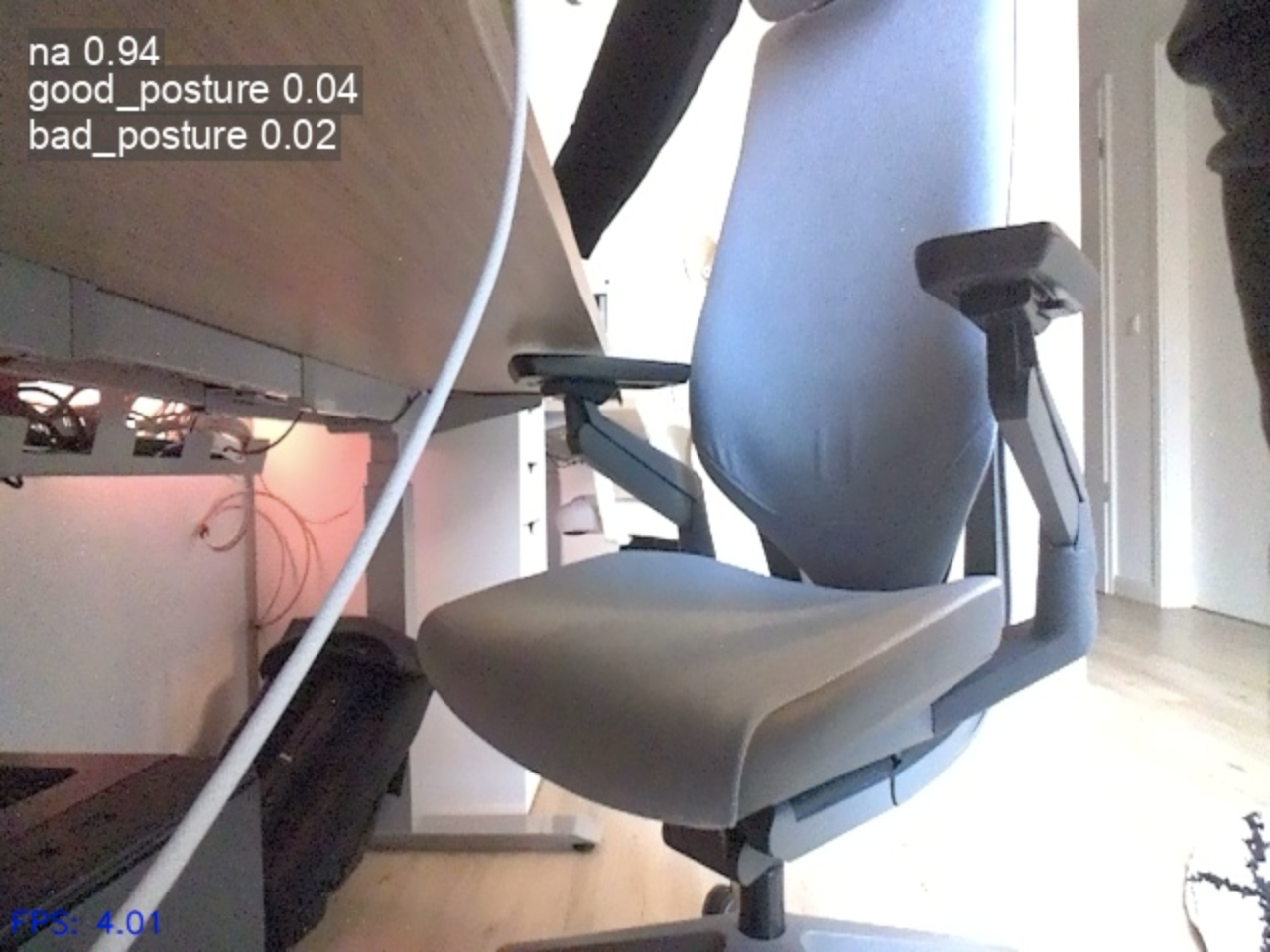
Examples of correct sitting posture detection
Something the model isn't very good at yet is to detect whenever I am slouching. I will admit that the difference is very minor compared to me sitting with good posture, so it's very hard to tell for the model. I also didn't have much training data of me slouching, so the detection may be able to improved later on.
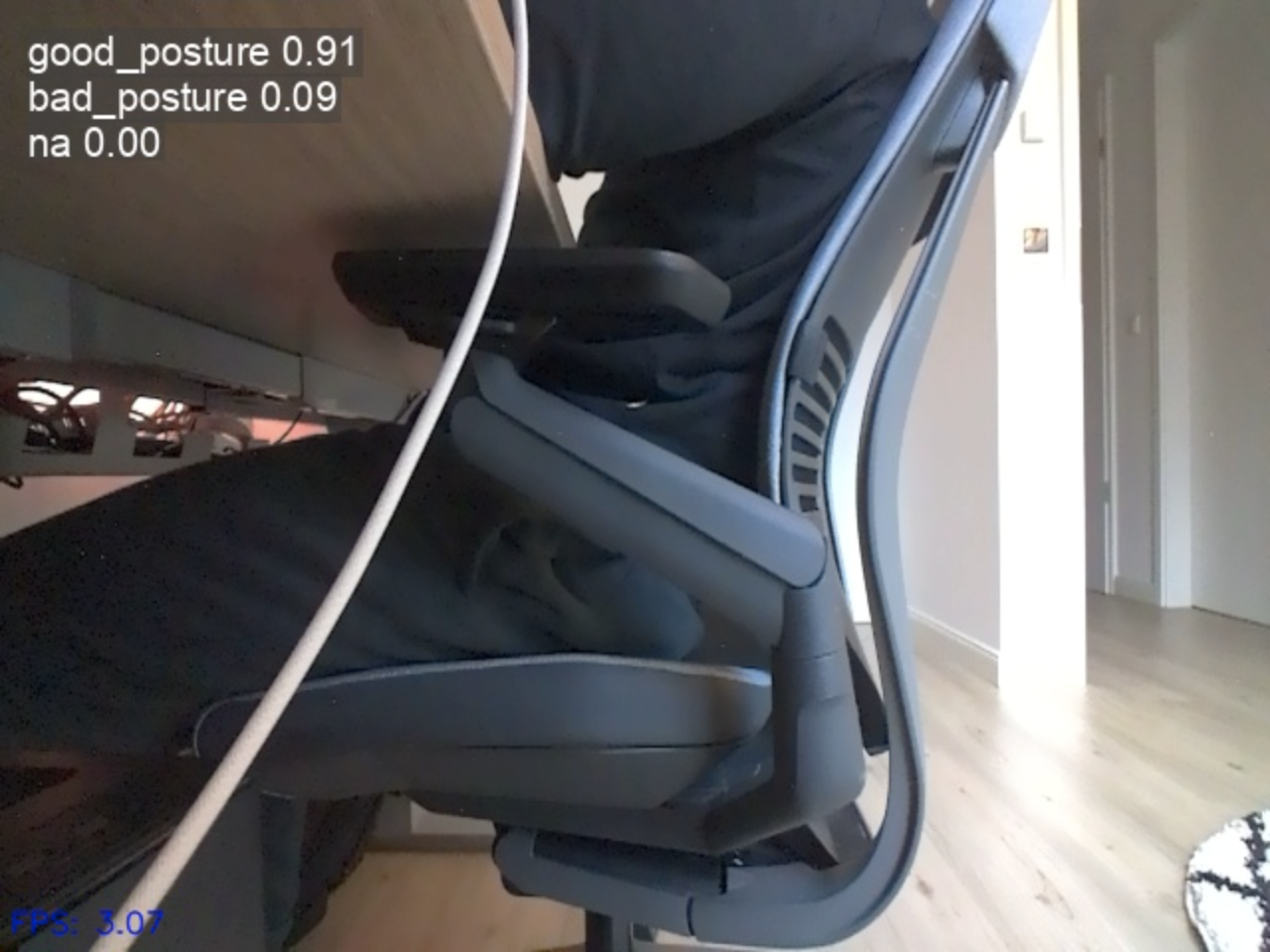
During the initial test I noticed that the performance wasn't great. Detection runs at about ~15 FPS and I wanted to see if there are improvements to be made.
Exporting the YOLO classification model to TensorRT
I decided to export the trained model in TensorRT format, because according to YOLO documentation, this should offer the best performance on the NVIDIA Jetson platform.
I had to switch back to the Jetson to perform the model export, as TensorRT is not supported on Mac. To improve inference speed, I opted to use INT8 quantization to increase speed even more, but at the cost of slightly reduced accuracy. I used this code to export the model to TensorRT format:
# Export model in TensorRT format

model = YOLO("models/trained-with-augmentation.pt")  # load a custom-trained model

# Export the model
model.export(
    format="engine",  # Export in TensorRT format
    int8=True,
    data='/home/hartlden/private/jetson-posture-monitor/dataset'
)
Running the model now yielded significant performance improvements. It now runs at ~30 FPS!
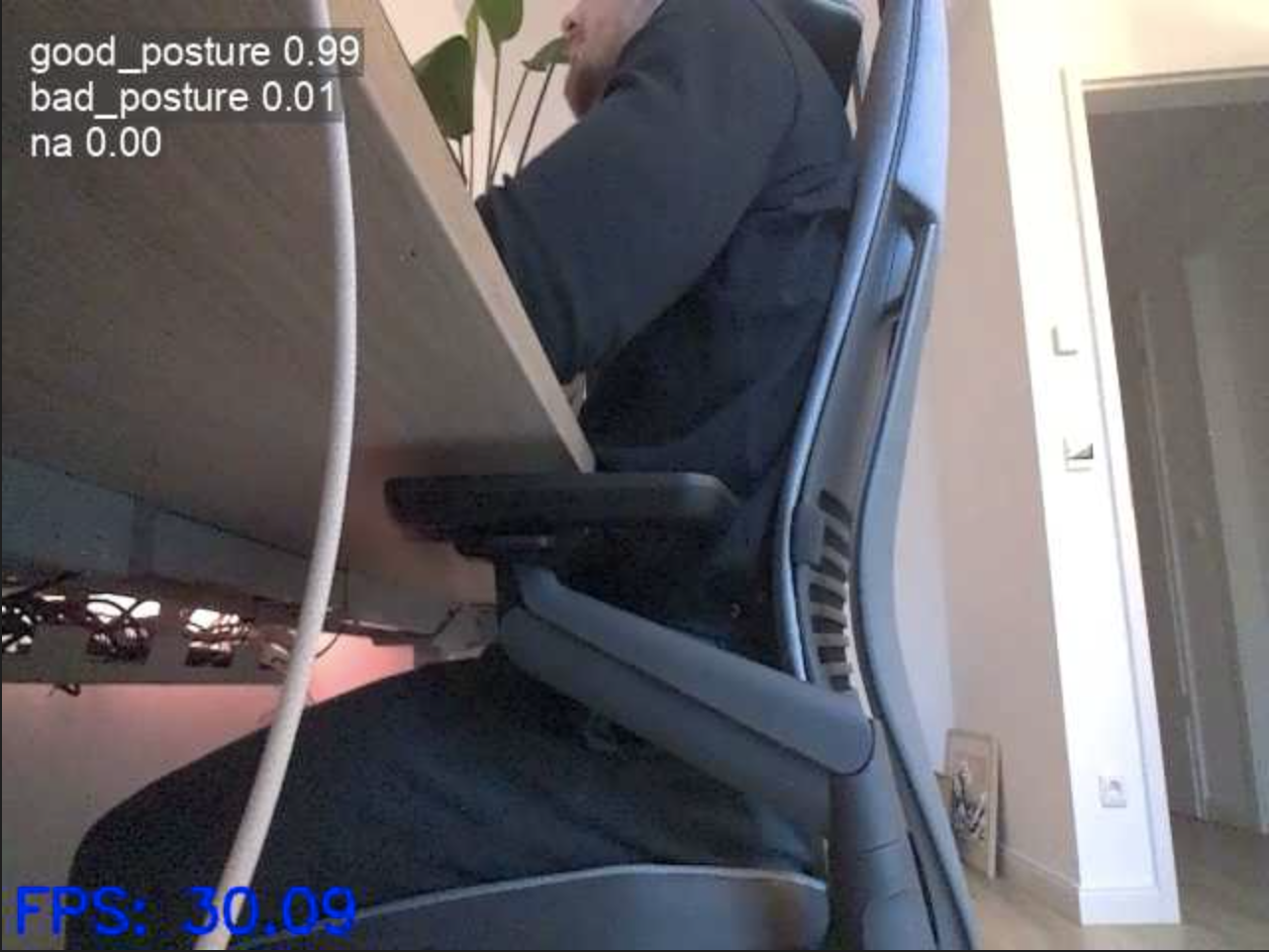
Conclusion
What a journey this post has been! To start out, we evaluated the use of YOLO's pose estimation feature for this project, but quickly discovered that it won't work for this use case because of the limited information about my actual pose the model has available when looking at me from the side.
Instead we chose to build upon YOLO's classification capabilities. We started by capturing and preparing training data to be used for model training. After running into some issues training the model directly on the NVIDIA Jetson, we finally successfully trained our first model by switching to a more powerful machine.
We explored different topics regarding training such as data augmentation and training epochs and learned to interpret training and validation metrics to judge and evaluate the trained models. Eventually we trained a first version of the model we will be using throughout this project.
Finally the model got exported to TensorRT format to increase its performance on the NVIDIA Jetson platform.
Bye
This first post of the project was so much fun for me! I learned a lot about AI model training and evaluation, and I really enjoyed to finally start of with a hands-on project. With the (for now) finished model in hand, we are at a great starting point for part 2, which will be about wrapping the model into a web platform and actually sending alerts when the model detects bad sitting posture.
Hopefully you've enjoyed this post and found it as interesting as I did. I really appreciate you taking the time to read through this!
Have you tried training custom YOLO models? What challenges did you run into? Leave your thoughts in the comments!
If you like what you've read, I'd really appreciate it if you share this article!
Also consider signing up for my posts to get them straight into your inbox:
Until next time!
Further reading
- Project GitHub repository: https://github.com/denishartl/jetson-posture-monitor
- Ultralytics: https://www.ultralytics.com/
- Ultralytics YOLO training documentation: https://docs.ultralytics.com/modes/train/#train-settings
- Computer vision Engineer's video about YOLO training: https://www.youtube.com/watch?v=ZeLg5rxLGLg
- Label Studio: https://labelstud.io/
- CVAT: https://www.cvat.ai/